
Skip to content
Fizen

Fizen API documentation

Everything you need to read bank account data and initiate payments through Fizen: how to authenticate, how a user gives consent, what we send to your callbacks and every endpoint with an example.

Imported from docs.fizen.com on 2026-10-28

Quick start

From the sandbox keys to the first transactions in four steps.

  1. Step 01

    Get sandbox keys

    Write to [email protected]. You get an apiKey and a token for the sandbox at api.sandbox.fizen.com, where the IP address is not checked.

  2. Step 02

    Ask the user for consent

    Call Start Linking Process for the user's bank and send the user to the bank address it returns. After approving in the bank, the user comes back to your redirectUri and Fizen posts the state and the list of accounts to your AIS callback.

  3. Step 03

    Read the data

    With the state and an accountId, read Account Details (balances, holder) and Account Transactions. A consent (state) for account data lives 200 days.

  4. Step 04

    Go to production

    Send us the public IP address of your server and three callback addresses (AIS, PIS, errors). You get production keys for api.app.fizen.com.

Environments

  • Sandbox

    Base URL
    https://api.sandbox.fizen.com
    Access
    apiKey and token; the IP address is not checked
    Good to know
    Banks: fizenbank (our test bank), ING, Alior, mBank. Up 8 AM to 6 PM UTC; outside those hours the first call wakes it up in 2 to 5 minutes.
  • Production

    Base URL
    https://api.app.fizen.com
    Access
    apiKey and token, only from your registered IP address
    Good to know
    Keys after you send us your server's IP address at [email protected].

Test credentials for the bank sandboxes

Authentication

Every request carries two headers with the values Fizen gives you: apiKey and token. In production each request must also come from the one public IP address you registered. Keep the keys on your server: never in a browser or a mobile app.

curl 'https://api.sandbox.fizen.com/banks/list' \  -H 'apiKey: [apiKey]' \  -H 'token: [token]' \  -H 'operationType: AIS'

Callbacks

When a user finishes in the bank, Fizen sends a POST with JSON to an address you give us. Configure three: one for account data (AIS), one for payments (PIS) and one for errors (both).

Account data (AIS)

Account data (AIS)
FieldMeaning
stateThe consent identifier: use it in every later call for this user and bank.
userIdYour identifier of the user, as you passed it when starting the flow.
bankIdThe bank the user chose.
accounts[].accountIdThe accounts the user shared.
consentExpirationDateTimeWhen the consent ends; after that no data can be read.

Payments (PIS)

Payments (PIS)
FieldMeaning
stateThe payment identifier: ask for the payment status with it.
userIdYour identifier of the user.
bankIdThe payer's bank.
paymentStatusThe payment status, see Payment statuses below.
amountThe amount, a decimal such as 0.01.
executionDateOptional: the execution date of a scheduled payment, YYYY-MM-DD.

Errors (AIS and PIS)

Errors (AIS and PIS)
FieldMeaning
errorIdA unique identifier of the error: quote it to Fizen support.
errorDetailsWhat went wrong.
bankIdThe bank of the request.
stateThe consent or payment the error is about.
userIdYour identifier of the user.
bankResponseCodeOptional: the bank's own code, when enabled for your account.
bankResponseMessageOptional: the bank's own message, when enabled for your account.

Callbacks come only from these addresses, so you can filter the rest out:

  • Sandbox

    Fizen IP addresses
    34.118.93.200
  • Production

    Fizen IP addresses
    34.116.211.162, 34.118.70.53

Payment statuses

The same values come in the PIS callback and from the payment status endpoints. Banks may report them at different moments.

Payment statuses
StatusMeaning
SUBMITTEDApproved and submitted to the bank, waiting to be executed.
SCHEDULEDScheduled for a future date.
PENDINGWaiting for verification or approval.
IN_PROGRESSA recurring payment running on schedule, or a bundle with at least one future-dated transfer (Fizen API).
RECURRING_PLANNEDA recurring payment set up and running on schedule (Fizen Pay).
CANCELEDCancelled by the user or the system before execution.
REJECTEDRejected; it will not be executed.
DONEExecuted and on the recipient's account.

How long a state lives

Each consent or payment has its state. After this time it can no longer be used.

  • Account data (AIS)

    State lifetime
    200 days
  • Domestic and express payment

    State lifetime
    30 days
  • Future-dated payment

    State lifetime
    execution date + 30 days
  • Payment cancellation

    State lifetime
    30 days
  • Recurring payment

    State lifetime
    end date + 30 days
  • Bundle payment

    State lifetime
    latest execution date + 30 days

Errors

An error comes back as JSON with an HTTP status. Keep the errorId: Fizen support finds the request by it.

Errors
HTTP statusWhen
400The request is not valid: a missing header or a wrong value (errorMessage says which).
401Missing or wrong apiKey or token, or a production call from an unregistered IP address.
404Unknown state, or a state that does not belong to this bank.
430The bank returned an error. Optional bankResponseCode and bankResponseMessage say more when enabled.
500An error on Fizen's side. Try again later; if it repeats, write to us with the errorId.

Fizen Widget

Instead of building the bank choice yourself, embed the Fizen Widget as an iframe: it takes the user through choosing the bank and giving consent. Bank login and password never pass through your server.

Watch the widget demo

Banks

Retail, business and corporate accounts at the main commercial banks in Poland, Czech Republic, Slovakia, Hungary and Romania. Which bank is live for which service: Bank list and status

Licences

Fizen Sp. z o.o. provides account information services (AIS) as an account information service provider in the KNF register (AISP13/2022). Payment initiation (PIS) runs on Fizen's technology with your own PISP licence and production certificates, or with our partner Meest Transfer Sp. z o.o. (KNF, AKPP/27/2024).

Every endpoint of the Fizen API, grouped as on docs.fizen.com. Descriptions and field names are in English. Each endpoint needs the apiKey and token headers (not repeated below).

Fizen Pay: the payment gateway

How Fizen Pay works

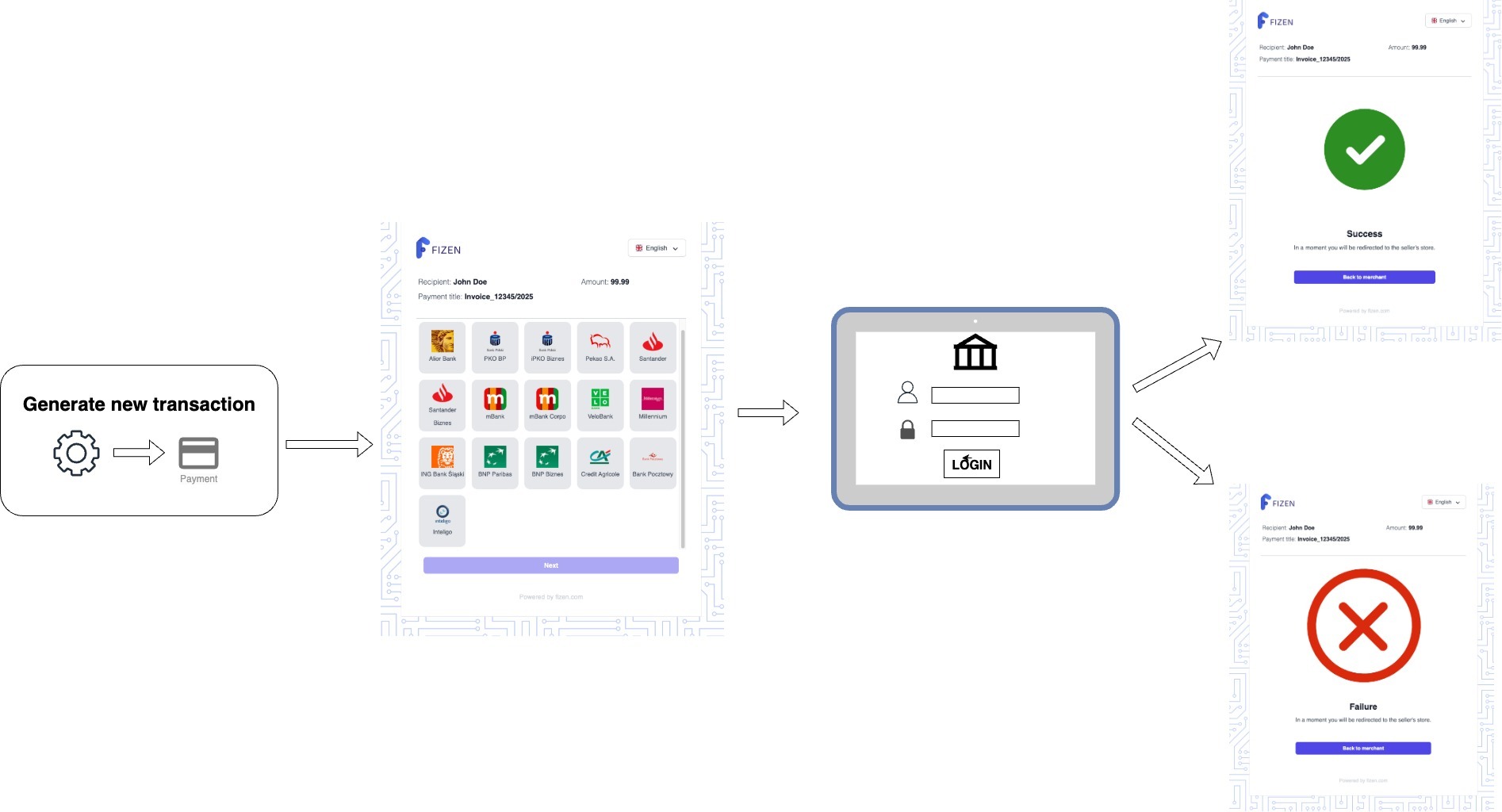
FizenPay is a payment page hosted by Fizen where users complete all the steps of the payment process: selecting the customer's bank, initializing the payment process, and redirecting to the bank service to allow the user to complete the payment. Payment is initiated through a dedicated endpoint, through this endpoint payment parameters are provided.

Payment flow

The payment process begins with the generation of a payment link. The user clicks on the link and is redirected to a panel to select the bank from which they want to make the payment. Image: Image Alt Text

Once the payment is approved at the bank, the user is redirected to a screen with the status of the payment. Finally on the page we are expected to see a green status, which means that the payment was successful. Red x at the end means that payment failed. Once the final status is received, it also sends feedback to the addresses provided earlier.

Create a transaction

To start working with the payment gateway it is necessary to generate the access keys for this purpose contact us. In the next step, it is necessary to create a transaction by calling the API endpoint.

POST/fizenPay/createTransaction

Generate Domestic Transaction

This endpoint allows to init payment process via Fizen Pay service. Initiating the payment process, it is necessary to provide some key information about the payment as well as information for subsequent payment processing like userId, callback address. You must also specify recipient data like recipientName, recipientAddress, recipientAccountNumber.

Only one expiration parameter can be used: either days or minutes. Providing both at the same time is not allowed.

For corporate accounts, certain banks require additional information.

Corporate Bank Accounts:

  • For Paribas and Credit Agricole corporate accounts, the parameter nip is required. This represents the company's tax identification number (NIP).
Request body
Generate Domestic Transaction: Request body
FieldTypeDescription
transferTitlerequiredstringA unique identifier or reference for the transfer, such as an order number.
amountrequiredstringThe amount to be transferred, formatted as a string (e.g., "420.69").
userIdrequiredstringThe unique identifier associated with the user initiating the transfer (e.g., "USER_69420").
callbackSuccessrequiredstringThe callback URL for a successful transaction.
callbackFailurerequiredstringThe callback URL for a failed transaction.
recipientNameoptionalstringThe name of the recipient.
recipientAddressoptionalstringThe address of the recipient.
recipientAccountNumberoptionalstringThe account number of the recipient.
nipoptionalstring**Required for corporate accounts at Paribas and Credit Agricole.** The company's tax identification number (NIP).
linkExpirationDaysoptionalintegerThe number of days the link remains valid, after which the link expires.
linkExpirationMinutesoptionalintegerThe number of minutes the link remains valid, after which the link expires.
Responses
  • 200OK
  • 400Bad Request
  • 401Not Found
  • 500Internal Server Error
curl -X POST 'https://api.sandbox.fizen.com/fizenPay/createTransaction' \  -H 'apiKey: [apiKey]' \  -H 'token: [token]' \  -H 'Content-Type: application/json' \  -d '{  "transferTitle": "",  "amount": "",  "userId": "",  "callbackSuccess": "",  "callbackFailure": "",  "recipientName": "",  "recipientAddress": "",  "recipientAccountNumber": "",  "nip": "1234567890",  "linkExpirationDays": 3,  "linkExpirationMinutes": 25}'
POST/fizenPay/createRecurring

Generate Recurring Transaction

This endpoint allows to init recurring payment process via Fizen Pay service. Initiating the recurring payment process, it is necessary to provide some key information about the payment as well as information for subsequent payment processing like userId, callback address, You must also specify recipient data like recipientName, recipientAddress, recipientAccountNumber.

Only one expiration parameter can be used: either days or minutes. Providing both at the same time is not allowed.

For corporate accounts, certain banks require additional information.

Corporate Bank Accounts:

  • For Paribas and Credit Agricole corporate accounts, the parameter nip is required. This represents the company's tax identification number (NIP).
Request body
Generate Recurring Transaction: Request body
FieldTypeDescription
transferTitlerequiredstringA unique identifier or reference for the transfer, such as an order number.
amountrequiredstringThe amount to be transferred, formatted as a string (e.g., "42.59").
periodrequiredenumThe payment frequency, formatted as an enum ("DAY", "YEAR","MONTH", "WEEK"). **mBank, Pekao, Paribas** are not available for DAY frequencies.Values: DAY, YEAR, MONTH, WEEK
startDaterequiredstringA date the recurring payment start, formatted as a string (e.g., "2024-10-10").
endDaterequiredstringA date the recurring payment end, formatted as a string (e.g., "2025-10-10").
userIdrequiredstringThe unique identifier associated with the user initiating the transfer (e.g., "USER_69420").
callbackSuccessrequiredstringThe callback URL for a successful transaction.
callbackFailurerequiredstringThe callback URL for a failed transaction.
recipientNameoptionalstringThe name of the recipient.
recipientAddressoptionalstringThe address of the recipient.
recipientAccountNumberoptionalstringThe account number of the recipient.
linkExpirationDaysoptionalintegerThe number of days the link remains valid, after which the link expires.
linkExpirationMinutesoptionalintegerThe number of minutes the link remains valid, after which the link expires.
nipoptionalstring**Required for corporate accounts at Paribas and Credit Agricole.** The company's tax identification number (NIP).
Responses
  • 200OK
  • 400Bad Request
  • 401Unauthorized
  • 500Internal Server Error
curl -X POST 'https://api.sandbox.fizen.com/fizenPay/createRecurring' \  -H 'apiKey: [apiKey]' \  -H 'token: [token]' \  -H 'Content-Type: application/json' \  -d '{  "transferTitle": "",  "amount": "",  "period": "DAY",  "startDate": "",  "endDate": "",  "userId": "",  "callbackSuccess": "",  "callbackFailure": "",  "recipientName": "",  "recipientAddress": "",  "recipientAccountNumber": "",  "linkExpirationDays": 3,  "linkExpirationMinutes": 25,  "nip": "1234567890"}'
POST/fizenPay/createExpress

Generate Express Domestic Transaction

This endpoint allows to init express payment process via Fizen Pay service. Initiating the payment process, it is necessary to provide some key information about the payment as well as information for subsequent payment processing like userId, callback address. You must also specify recipient data like recipientName, recipientAddress, recipientAccountNumber.

Only one expiration parameter can be used: either days or minutes. Providing both at the same time is not allowed.

Request body
Generate Express Domestic Transaction: Request body
FieldTypeDescription
transferTitlerequiredstringA unique identifier or reference for the transfer, such as an order number.
amountrequiredstringThe amount to be transferred, formatted as a string (e.g., "420.69").
userIdrequiredstringThe unique identifier associated with the user initiating the transfer (e.g., "USER_69420").
callbackSuccessrequiredstringThe callback URL for a successful transaction.
callbackFailurerequiredstringThe callback URL for a failed transaction.
recipientNameoptionalstringThe name of the recipient.
recipientAddressoptionalstringThe address of the recipient.
recipientAccountNumberoptionalstringThe account number of the recipient.
linkExpirationDaysoptionalintegerThe number of days the link remains valid, after which the link expires.
linkExpirationMinutesoptionalintegerThe number of minutes the link remains valid, after which the link expires.
Responses
  • 200OK
  • 400Bad Request
  • 401Not Found
  • 500Internal Server Error
curl -X POST 'https://api.sandbox.fizen.com/fizenPay/createExpress' \  -H 'apiKey: [apiKey]' \  -H 'token: [token]' \  -H 'Content-Type: application/json' \  -d '{  "transferTitle": "",  "amount": "",  "userId": "",  "callbackSuccess": "",  "callbackFailure": "",  "recipientName": "",  "recipientAddress": "",  "recipientAccountNumber": "",  "linkExpirationDays": 3,  "linkExpirationMinutes": 25}'
DELETE/fizenPay/invalidateTransaction/{transactionId}

Invalidate Transaction

This endpoint allows to invalidates Fizen Pay payment process. Invalidates (cancels) an existing Fizen Pay transaction identified by transactionId. For an already invalidated transaction endpoint will return success.

Parameters
Invalidate Transaction: Parameters
NameInTypeDescription
transactionIdrequiredpathstringUnique identifier of the transaction to invalidate.Example: f86ced6e-9abd-11f0-a376-0b874019f2aa
Responses
  • 200No Content – the transaction was invalidated and no body is returned.
  • 400Bad Request – invalid `transactionId` or missing required headers.
  • 401Unauthorized – invalid or missing `apiKey`/`token`.
  • 404Not Found – the transaction with the given `transactionId` does not exist.
  • 500Internal Server Error
curl -X DELETE 'https://api.sandbox.fizen.com/fizenPay/invalidateTransaction/[transactionId]' \  -H 'apiKey: [apiKey]' \  -H 'token: [token]'

Banks, consents and analytics

Banks List

A list of available banks for AIS and PIS services along with redirecting to the chosen bank interface

GET/banks/list

Banks List

List of available banks to authorise a consent for Account Information Service (AIS) and Payment Initiation Services (PIS)

Parameters
Banks List: Parameters
NameInTypeDescription
operationTyperequiredheaderstringSpecify service to access.Example: AIS
Responses
  • 200OK
  • 400Bad Request
curl -X GET 'https://api.sandbox.fizen.com/banks/list' \  -H 'apiKey: [apiKey]' \  -H 'token: [token]' \  -H 'operationType: [operationType]'

Consents

A list of available consents for Account Information Service (AIS), together with a complete consent management flow that allows clients to grant, verify, and revoke user consents in a transparent and controlled manner.

This part of the service provides full control over user consents, enabling clients to clearly manage which permissions have been granted.

Through dedicated endpoints, clients can:

  • retrieve the latest consent definitions configured for a given client
  • grant selected consents to a user based on a specific version
  • verify the current status of all consents assigned to a user
  • revoke previously granted consents at any time

This approach guarantees that access to user data is always aligned with explicitly granted permissions, supporting compliance with regulatory requirements and improving trust by giving clear visibility into how user consents are managed.

Additionally, the service integrates with the bank authorization flow, where the user is redirected to a bank interface to approve access. After successful authorization, the consent state is updated and can be managed via the available API operations.

GET/fizen-consents/consents

Get client consents definition

Returns the latest version of consents configured for the client.

Required consents: AIS_POLICY_ACCEPTANCE, AIS_PERSONAL_DATA_PROCESSING, AIS_DATA_TRANSFER

Optional consents: AIS_DATA_TRANSFER_TO_THIRD_PARTY

Parameters
Get client consents definition: Parameters
NameInTypeDescription
apikeyrequiredheaderstringAPI key assigned to the client (required in practice for authorization)Example: 9693455a2698ff0316f14da3c30a18c97a4d0000
Responses
  • 200Successfully returned client consents definition
  • 401Unauthorized - invalid or missing credentials
  • 500Internal Server Error - problem retrieving consents definition
curl -X GET 'https://api.sandbox.fizen.com/fizen-consents/consents' \  -H 'apiKey: [apiKey]' \  -H 'token: [token]' \  -H 'apikey: [apikey]'
GET/fizen-consents/consents/{userId}

Get user consents

Returns consents assigned to a specific user along with their current status.

Required consents: AIS_POLICY_ACCEPTANCE, AIS_PERSONAL_DATA_PROCESSING, AIS_DATA_TRANSFER

Optional consents: AIS_DATA_TRANSFER_TO_THIRD_PARTY

Parameters
Get user consents: Parameters
NameInTypeDescription
apikeyrequiredheaderstringAPI key assigned to the clientExample: 9693455a2698ff0316f14da3c30a18c97a4d0000
userIdrequiredpathstringUnique identifier of the userExample: user-123
Responses
  • 200Successfully returned user consents
  • 401Unauthorized - authentication failed
  • 404Not Found - user does not exist
  • 500Internal Server Error
curl -X GET 'https://api.sandbox.fizen.com/fizen-consents/consents/[userId]' \  -H 'apiKey: [apiKey]' \  -H 'token: [token]' \  -H 'apikey: [apikey]'
POST/fizen-consents/consents/grant/{userId}

Grant consents to user

Assigns selected consents to a user. Updates existing ones if already present.

Required consents: AIS_POLICY_ACCEPTANCE, AIS_PERSONAL_DATA_PROCESSING, AIS_DATA_TRANSFER

Optional consents: AIS_DATA_TRANSFER_TO_THIRD_PARTY

Parameters
Grant consents to user: Parameters
NameInTypeDescription
apikeyrequiredheaderstringAPI key assigned to the clientExample: 9693455a2698ff0316f14da3c30a18c97a4d0000
userIdrequiredpathstringUnique identifier of the userExample: user-123
Request body
Grant consents to user: Request body
FieldTypeDescription
consentTypesrequiredstring[]List of consent types to grant
Responses
  • 204Consents successfully granted
  • 400Bad Request - validation error
  • 401Unauthorized
  • 404Not Found
  • 500Internal Server Error
curl -X POST 'https://api.sandbox.fizen.com/fizen-consents/consents/grant/[userId]' \  -H 'apiKey: [apiKey]' \  -H 'token: [token]' \  -H 'apikey: [apikey]' \  -H 'Content-Type: application/json' \  -d '{  "consentTypes": [    "AIS_POLICY_ACCEPTANCE"  ]}'
POST/fizen-consents/consents/revoke/{userId}

Revoke consents from user

Revokes selected consents for a user.

Required consents: AIS_POLICY_ACCEPTANCE, AIS_PERSONAL_DATA_PROCESSING, AIS_DATA_TRANSFER

Optional consents: AIS_DATA_TRANSFER_TO_THIRD_PARTY

Parameters
Revoke consents from user: Parameters
NameInTypeDescription
apikeyrequiredheaderstringAPI key assigned to the clientExample: 9693455a2698ff0316f14da3c30a18c97a4d0000
userIdrequiredpathstringUnique identifier of the userExample: user-123
Request body
Revoke consents from user: Request body
FieldTypeDescription
consentTypesrequiredstring[]List of consent types to revoke
Responses
  • 204Consents successfully revoked
  • 400Bad Request - validation error
  • 401Unauthorized
  • 404Not Found
  • 500Internal Server Error
curl -X POST 'https://api.sandbox.fizen.com/fizen-consents/consents/revoke/[userId]' \  -H 'apiKey: [apiKey]' \  -H 'token: [token]' \  -H 'apikey: [apikey]' \  -H 'Content-Type: application/json' \  -d '{  "consentTypes": [    "AIS_POLICY_ACCEPTANCE"  ]}'

Analytics

A set of endpoints that provides access to transaction summaries and analytical data for different payment types.

The analytics service allows clients to retrieve both detailed and aggregated transaction information for selected periods, helping them monitor activity, analyze payment execution, and support internal reporting processes.

Available endpoints allow clients to:

  • get recurring transaction summaries
  • get bundle payment summaries
  • get overall transaction summaries across all transaction types

Returned data may include transaction lists, daily statistics, SCA and non-SCA breakdowns, total number of transactions, and total transaction amounts.

This section is intended for reporting and analytical purposes only and does not participate in the transaction initiation process.

Important: To access this part of the API, you need to contact Fizen Support to enable the required additional configuration.

GET/fizen-analytics/all-transactions/summary

Get all transactions summary

Returns a summary of all transactions for the selected month or, when the optional day header is provided, for the selected day. The response includes daily SCA and non-SCA statistics. The transaction list may contain domestic, recurring, and bundle transactions, each with its own set of fields.

Parameters
Get all transactions summary: Parameters
NameInTypeDescription
yearrequiredheaderintegerYear for which the transaction summary should be returnedExample: 2026
monthrequiredheaderintegerMonth for which the transaction summary should be returnedExample: 4
dayoptionalheaderintegerOptional day of the month for which the transaction summary should be returned. When omitted, the summary covers the entire selected monthExample: 15
client-namerequiredheaderstringName of the client for which we want to retrieve statisticsExample: example-client
Responses
  • 200All transactions summary returned successfully
  • 400Bad Request - validation error
  • 401Unauthorized
  • 500Internal Server Error
curl -X GET 'https://api.sandbox.fizen.com/fizen-analytics/all-transactions/summary' \  -H 'apiKey: [apiKey]' \  -H 'token: [token]' \  -H 'year: [year]' \  -H 'month: [month]' \  -H 'client-name: [client-name]'
GET/fizen-analytics/recurring-transactions/summary

Get recurring transactions summary

Returns a summary of recurring transactions for the selected month or, when the optional day header is provided, for the selected day. The response includes daily SCA and non-SCA statistics.

Parameters
Get recurring transactions summary: Parameters
NameInTypeDescription
yearrequiredheaderintegerYear for which the recurring transaction summary should be returnedExample: 2026
monthrequiredheaderintegerMonth for which the recurring transaction summary should be returnedExample: 4
dayoptionalheaderintegerOptional day of the month for which the recurring transaction summary should be returned. When omitted, the summary covers the entire selected monthExample: 15
client-namerequiredheaderstringName of the client for which we want to retrieve statisticsExample: example-client
Responses
  • 200Recurring transactions summary returned successfully
  • 400Bad Request - validation error
  • 401Unauthorized
  • 500Internal Server Error
curl -X GET 'https://api.sandbox.fizen.com/fizen-analytics/recurring-transactions/summary' \  -H 'apiKey: [apiKey]' \  -H 'token: [token]' \  -H 'year: [year]' \  -H 'month: [month]' \  -H 'client-name: [client-name]'
GET/fizen-analytics/bundle-transactions/summary

Get bundle transactions summary

Returns a summary of bundle transactions for the selected month or, when the optional day header is provided, for the selected day. The response includes daily SCA and non-SCA statistics.

Parameters
Get bundle transactions summary: Parameters
NameInTypeDescription
yearrequiredheaderintegerYear for which the bundle transaction summary should be returnedExample: 2026
monthrequiredheaderintegerMonth for which the bundle transaction summary should be returnedExample: 4
dayoptionalheaderintegerOptional day of the month for which the bundle transaction summary should be returned. When omitted, the summary covers the entire selected monthExample: 15
client-namerequiredheaderstringName of the client for which we want to retrieve statisticsExample: example-client
Responses
  • 200Bundle transactions summary returned successfully
  • 400Bad Request - validation error
  • 401Unauthorized
  • 500Internal Server Error
curl -X GET 'https://api.sandbox.fizen.com/fizen-analytics/bundle-transactions/summary' \  -H 'apiKey: [apiKey]' \  -H 'token: [token]' \  -H 'year: [year]' \  -H 'month: [month]' \  -H 'client-name: [client-name]'
GET/fizen-analytics/all-transactions/merchants/summary

Get all transactions summary for merchants

Returns a summary of all transactions for merchants available for the provided credentials, covering the selected month or, when the optional day header is provided, the selected day. The response contains the transaction list, daily SCA and non-SCA statistics, and aggregated totals for domestic, recurring, and bundle transactions.

Parameters
Get all transactions summary for merchants: Parameters
NameInTypeDescription
apikeyrequiredheaderstringAPI key assigned to the clientExample: 1dffbeac9d959af87667676767676767ef
yearrequiredheaderintegerYear for which the transaction summary should be returnedExample: 2026
monthrequiredheaderintegerMonth for which the transaction summary should be returnedExample: 5
dayoptionalheaderintegerOptional day of the month for which the transaction summary should be returned. When omitted, the summary covers the entire selected monthExample: 15
Responses
  • 200All transactions summary for merchants returned successfully
  • 400Bad Request - validation error
  • 401Unauthorized
  • 500Internal Server Error
curl -X GET 'https://api.sandbox.fizen.com/fizen-analytics/all-transactions/merchants/summary' \  -H 'apiKey: [apiKey]' \  -H 'token: [token]' \  -H 'apikey: [apikey]' \  -H 'year: [year]' \  -H 'month: [month]'
GET/fizen-analytics/all-transactions/merchants/grouped/summary

Get grouped all transactions summary for merchants

Returns an all-transactions summary grouped by merchant/client for the selected month or, when the optional day header is provided, for the selected day. Each item in the response represents one client and contains the transaction list for the selected period.

Parameters
Get grouped all transactions summary for merchants: Parameters
NameInTypeDescription
apikeyrequiredheaderstringAPI key assigned to the clientExample: 1dffbe345354wrjfnrjnjnfjnfcc3c77ef
yearrequiredheaderintegerYear for which grouped transaction summary should be returnedExample: 2026
monthrequiredheaderintegerMonth for which grouped transaction summary should be returnedExample: 4
dayoptionalheaderintegerOptional day of the month for which the grouped transaction summary should be returned. When omitted, the summary covers the entire selected monthExample: 15
Responses
  • 200Grouped all-transactions summary for merchants returned successfully
  • 400Bad Request - validation error
  • 401Unauthorized
  • 500Internal Server Error
curl -X GET 'https://api.sandbox.fizen.com/fizen-analytics/all-transactions/merchants/grouped/summary' \  -H 'apiKey: [apiKey]' \  -H 'token: [token]' \  -H 'apikey: [apikey]' \  -H 'year: [year]' \  -H 'month: [month]'

Personal accounts (Retail)

Account Information Service

FIZEN API for AIS, or Account Information Service, provides individuals with access to information about their payment accounts. With AIS, you can conveniently monitor the real-time status of your finances through various third-party applications. This service empowers users to gain a holistic view of their financial transactions and balances, making it easier to manage their financial affairs and make informed decisions about their money. AIS is a key component of PSD2 (Payment Services Directive 2), promoting financial transparency and enhancing the user's ability to leverage innovative financial tools and services.

GET/{bankId}/initiate/{redirectUri}

Start Linking Process

The process of gaining access to the user's account begins with the generation of redirect URL to the bank's interface, where the user can grant consent for access to their account information. After successfully completing the bank's process the user will be redirected to the specified redirect URL,and a callback with the relevant data will be sent.

State Grouping for Extended Banking Transaction Access

This feature allows grouping of consents (states) so that multiple states within the same group can share tokens, extending the time frame for fetching transactions beyond standard banking limits.

Purpose
  • Many banks impose strict time limits on transaction retrieval using a single consent (state).
  • For example, PKO BP allows only up to 4 hours, after which a new consent is required.
  • This solution will allow fetching transactions for at least 10 hours, which for PKO BP would require three separate consents for the same account.
How It Works
  • States will be grouped by the userId parameter.
  • To belong to the same group, states must have the same userId, bank, or client apiKey.
  • If a userId is not provided, the state will not be assigned to any group.
Parameters
Start Linking Process: Parameters
NameInTypeDescription
userIdoptionalheaderstringThe ID of the end user who agreed to provide access to the account information. ID generated on the client's side and passed to API FIZEN.Example: 432532453425
ipoptionalheaderstringEnd user IP addressExample: 10.10.54.1
agentoptionalheaderstringA browser agent that identifies the end user browser and operating system.Example: Mozilla/5.0 (Windows NT 10.0; Win64; x64) AppleWebKit/537.36 (KHTML, like Gecko) Chrome/72.0.3626.96 Safari/537.36
redirectUrirequiredpathstringThe address of the page to which the user will be redirected after completing the data sharing authorization processExample: https%3A%2F%2redirectUri.com
bankIdrequiredpathstringBank identifier the user will authorize consent for Account Information Service (AIS) and Payment Initiation Services (PIS)Example: alior
limitedScoperequiredheaderbooleanValue informs whether access to the account will be limited to basic data.Example: true
Responses
  • 200OK
  • 400Bad Request
  • 404Not Found
  • 430Request Failed
  • 500Internal Server Error
curl -X GET 'https://api.sandbox.fizen.com/[bankId]/initiate/[redirectUri]' \  -H 'apiKey: [apiKey]' \  -H 'token: [token]' \  -H 'limitedScope: [limitedScope]'
GET/{bankId}/account/{accountId}

Account Details

This endpoint allows obtaining detailed information about the user's account for which they have previously granted consent, including information such as account owner, account number, account currency, available account balance, and account description. The data returned by our system depends on the information provided by each respective bank. As a result, the details of the response may vary between different banks. Users should account for potential differences in available data when integrating with our API.

Parameters
Account Details: Parameters
NameInTypeDescription
staterequiredheaderstringThe value generated when starting the linking process for the particular bank interface to authorize consent to retrieve the account information (AIS service)Example: d2b75e70-c735-13ed-9018-4510c14d98bc
accountIdrequiredpathstringThe bank account ID to which the end user has consented to provide access to the account information. One of the values necessary to query information about an accountExample: VmhJQ0lKSHBKcEJ4TXByNHE2U3BKMG1SU3JXYStFVXBISDdCQUhLaHJXcz0=
bankIdrequiredpathstringBank identifier the user will authorize consent for Account Information Service (AIS) and Payment Initiation Services (PIS)Example: alior
Responses
  • 200OK
  • 400Bad Request
  • 404Not Found
  • 430Request Failed
  • 500Internal Server Error
curl -X GET 'https://api.sandbox.fizen.com/[bankId]/account/[accountId]' \  -H 'apiKey: [apiKey]' \  -H 'token: [token]' \  -H 'state: [state]'
GET/{bankId}/account/{accountId}/transactions

Account Transactions

This endpoint enables access to the transaction history for a specific account number for which consent has been obtained previously. The data returned by our system depends on the information provided by each respective bank. As a result, the details of the response may vary between different banks. Users should account for potential differences in available data when integrating with our API.

If certain transaction types cannot be retrieved due to an issue (e.g., database timeout, temporary service unavailability), the response will still contain the successfully retrieved transactions and will also include a new field: transactionsStatusesFetchFailures, which lists the transaction types that failed to be fetched.

If all transaction types fail to be retrieved:

  • The transactions list will be empty.
  • The transactionsStatusesFetchFailures field will include all requested transaction types.

Example Scenarios:

  • Only DONE transactions fail for mBank.
  • Two transaction types fail for Pekao.
  • All transaction types fail for Erste.
Exception Handling

There is one exception to this mechanism: If the request exceeds the operation limit, the system will return an explicit error response without including the transactions list or the transactionsStatusesFetchFailures field. In this case, the client must retry the request after resolving the issue (e.g., reducing the number of transactions requested).

Parameters
Account Transactions: Parameters
NameInTypeDescription
staterequiredheaderstringThe value generated when starting the linking process for the particular bank interface to authorize consent to retrieve the account information (AIS service)Example: d2b75e70-c735-13ed-9018-4510c14d98bc
tradeDateFromoptionalheaderstringStart date from which data should be returned (inclusive). The date must be in the past (earlier than today; today's date is not allowed). Expected format is ISO 8601 date (YYYY-MM-DD).Example: 2026-01-01
accountIdrequiredpathstringThe bank account ID to which the end user has consented to provide access to the account information. One of the values necessary to query information about an accountExample: VmhJQ0lKSHBKcEJ4TXByNHE2U3BKMG1SU3JXYStFVXBISDdCQUhLaHJXcz0=
bankIdrequiredpathstringBank identifier the user will authorize consent for Account Information Service (AIS) and Payment Initiation Services (PIS)Example: alior
includeAllTransactionStatusesoptionalheaderbooleanOptional flag controlling which transaction statuses are returned in the response. By default (when the header is not provided or set to false), the API returns only transactions with the following statuses: DONE, PENDING, HOLD. Transactions with statuses REJECTED, CANCELED, and SCHEDULED are excluded. When set to true, the API returns all available transaction statuses, including REJECTED, CANCELED, and SCHEDULED (if such transactions exist for the given bank/account).Example: true
Responses
  • 200OK
  • 400Bad Request
  • 404Not Found
  • 430Request Failed
  • 500Internal Server Error
curl -X GET 'https://api.sandbox.fizen.com/[bankId]/account/[accountId]/transactions' \  -H 'apiKey: [apiKey]' \  -H 'token: [token]' \  -H 'state: [state]'
GET/{bankId}/KYC/{accountId}

KYC

This service provides a transparent way to access the user's identity by leveraging the granted consent for account access. It provides a field containing crucial information, such as the user's name and address, for precise user identification.

Parameters
KYC: Parameters
NameInTypeDescription
staterequiredheaderstringThe value generated when starting the linking process for the particular bank interface to authorize consent to retrieve the account information (AIS service)Example: d2b75e70-c735-13ed-9018-4510c14d98bc
accountIdrequiredpathstringThe bank account ID to which the end user has consented to provide access to the account information. One of the values necessary to query information about an accountExample: VmhJQ0lKSHBKcEJ4TXByNHE2U3BKMG1SU3JXYStFVXBISDdCQUhLaHJXcz0=
bankIdrequiredpathstringBank identifier the user will authorize consent for Account Information Service (AIS) and Payment Initiation Services (PIS)Example: alior
Responses
  • 200OK
  • 400Bad Request
  • 404Not Found
  • 430Request Failed
  • 500Internal Server Error
curl -X GET 'https://api.sandbox.fizen.com/[bankId]/KYC/[accountId]' \  -H 'apiKey: [apiKey]' \  -H 'token: [token]' \  -H 'state: [state]'

Domestic Payment

FIZEN's Domestic Payment Services are responsible for processing domestic payments.

In this context, a domestic payment refers to a financial transaction in which funds are transferred from one bank account to another within the same country or a specific geographical region, typically using the local currency. These payments serve various purposes, including bill payments, transferring money to family and friends, making purchases, and settling financial obligations within the same country or region. It's important to distinguish domestic payments from international payments, which involve the transfer of funds between bank accounts located in different countries, often requiring currency conversion and compliance with international banking regulations.

It's important to highlight that payments initiated and approved by users through their banking service cannot be canceled. This guarantees the successful delivery of payments, ensuring that once a user authorizes a transaction, it will be executed as scheduled. This assurance contributes to the reliability and trustworthiness of the domestic payment service, giving users peace of mind regarding the arrival of their funds at the intended destination.

GET/{bankId}/payment/initiate/{redirectUri}

Start Payment Process

The payment initialization endpoint serves as a crucial access point for initiating domestic payment processes. In response to this endpoint, a redirect URL is generated, directing the user to the bank's authorization page.

On the bank's page, the user has the opportunity to verify the accuracy of the payment details required for the transfer and to confirm the payment. Once the payment is approved by the user, they will be redirected to the previously defined page, and the transaction data will be transmitted via a callback.

When making a payment, you have the option to perform a split payment.

The split payment mechanism is a payment system in which the amount of VAT, which is separated from the gross amount due to the seller, is transferred to a separate bank account, called a VAT account, to which the seller has limited access.

To successfully initiate a split payment, you must provide all four parameters: spInvoiceNumber, spTaxIdentificationNumber, spTaxAmount, spDescription.

If at least one of these parameters is provided but others are missing, the split payment request will be rejected.

Split payment for retail transactions is available for specific banks because payments from sole proprietorship accounts are processed through this banking endpoint. The list of supported banks includes: mBank, BNP Paribas, NEST, Alior, Credit Agricole, Velo.

Parameters
Start Payment Process: Parameters
NameInTypeDescription
amountrequiredheaderstringExample: 0.99
recipientAccountNumberoptionalheaderstringRecipient Account Number in IBAN format. Value required if Recipient Account Number is not set up by Fizen config
recipientNameAddressoptionalheaderstringRecipient Name & Address. Value required if Recipient Name Address is not set up by Fizen config. To handle Polish characters, URL encoding is necessary.Example: Jan Kowalski ul. Zbiorcza 2 m45 90-300 Lodz
spInvoiceNumberoptionalheaderstringPayment Invoice Number (Required for split payment mechanism)Example: INV001/2023/24
spTaxIdentificationNumberoptionalheaderstringTax Identification Number (NIP) (Required for split payment mechanism)Example: 3788796687
spTaxAmountoptionalheaderstringAmount of VAT tax (Required for split payment mechanism)Example: 460
spDescriptionoptionalheaderstringA brief description of the payment (Required for split payment mechanism)Example: VAT for January services
senderAccountNumberoptionalheaderstringSender Account Number in IBAN format. Value required if Sender Account Number is not set up by Fizen config
userIdoptionalheaderstringThe unique identifier of the end user initiating the payment. The value is generated by the client and passed to the Fizen API.Example: 432532453425
titleoptionalheaderstringA transfer title generated by the client and passed to the Fizen API. The title must contain between 5 and 80 characters ([a-zA-Z0-9\\_\\-\\s\\.\\:\/]). To handle Polish characters, URL encoding is necessary.Example: FV/1234/22
ipoptionalheaderstringEnd user IP addressExample: 10.10.54.1
agentoptionalheaderstringA browser agent that identifies the end user browser and operating systemExample: Mozilla/5.0 (Windows NT 10.0; Win64; x64) AppleWebKit/537.36 (KHTML, like Gecko) Chrome/72.0.3626.96 Safari/537.36
bankIdrequiredpathstringBank identifier the user will authorize consent for Account Information Service (AIS) and Payment Initiation Services (PIS)Example: alior
redirectUrirequiredpathstringThe address of the page to which the user will be redirected after completing the data sharing authorization processExample: https://redirect-url.com
Responses
  • 200OK
  • 400Bad Request
  • 404Not Found
  • 430Request Failed
  • 500Internal Server Error
curl -X GET 'https://api.sandbox.fizen.com/[bankId]/payment/initiate/[redirectUri]' \  -H 'apiKey: [apiKey]' \  -H 'token: [token]' \  -H 'amount: [amount]'
GET/payment

Payment status

The "Get Payment Status" endpoint allows customers to check the status of their payments. When this endpoint is called, the system returns the current status of a specific payment, enabling users to track the progress and history of their transactions.

This functionality provides users with real-time access to the status of their payments, offering transparency and visibility into their financial transactions. However, the returned payment statuses may vary depending on the bank, and the timing of status updates can also differ based on the bank's processing schedule.

Parameters
Payment status: Parameters
NameInTypeDescription
staterequiredheaderstringThe value generated when starting the linking process for the particular bank interface to authorize consent to initiate paymentExample: ODY5MzQ4NWMyNjk4ZmYwMzE2ZjE0ZGEzYzMwYTE4Yzk3YTRkMDY4MV80M2E3
Responses
  • 200OK
  • 400Bad Request
  • 404Not Found
  • 430Request Failed
  • 500Internal Server Error
curl -X GET 'https://api.sandbox.fizen.com/payment' \  -H 'apiKey: [apiKey]' \  -H 'token: [token]' \  -H 'state: [state]'

Future Date Payment

FIZEN's Future Date Domestic Payment Services are responsible for processing domestic payments with a future date. This specialized service operates in a manner similar to standard domestic payments but introduces the ability to schedule payments for specific dates in the future. It allows users to proactively set up payments in advance, ensuring that financial commitments are met precisely when needed. Future date domestic payments offer a valuable solution for planning and managing financial transactions within the same country or specific geographical region, granting users greater flexibility and control over their payment schedules. It's important to emphasize that this service remains distinct from international payments, focusing solely on domestic transactions and eliminating the complexities associated with cross-border transfers and currency conversion.

It's important to emphasize that this service allows for the cancellation of scheduled payments until the transfer is executed, providing users with complete control over their finances. This feature ensures that users have the flexibility to modify or cancel future date domestic payments as needed, offering peace of mind and adaptability in managing their financial commitments.

Additionally, it's worth noting that this service also provides users with the option to lock funds in their account, in which case the cancellation of a transfer may not be possible.

GET/{bankId}/payment/future/initiate/{redirectUri}

Start Payment Process

The "Initiate Future Date Payment" endpoint serves as a crucial access point for initiating future-dated payment processes. Upon calling this endpoint, a redirect URL is generated in response, directing the user to the bank's authorization page.

On the bank's page, users have the opportunity to verify the accuracy of the payment details required for the future-dated transfer and to confirm the payment. Once the payment is approved by the user, they will be redirected to the previously defined page, and the transaction data will be transmitted via a callback.

Parameters
Start Payment Process: Parameters
NameInTypeDescription
amountrequiredheaderstringExample: 0.99
executionDaterequiredheaderstringPayment execution dateExample: 2025-02-10
recipientAccountNumberoptionalheaderstringRecipient Account Number in IBAN format. Value required if Recipient Account Number is not set up by Fizen config. To handle Polish characters, URL encoding is necessary.
recipientNameAddressoptionalheaderstringRecipient Name & Address. Value required if Recipient Name Address is not set up by Fizen config. To handle Polish characters, URL encoding is necessary.Example: Jan Kowalski ul. Zbiorcza 2 m45 90-300 Lodz
userIdoptionalheaderstringThe unique identifier of the end user initiating the payment. The value is generated by the client and passed to the Fizen API.Example: 432532453425
titleoptionalheaderstringA transfer title generated by the client and passed to the Fizen API. The title must contain between 5 and 80 characters ([a-zA-Z0-9\\_\\-\\s\\.\\:\/]).Example: FV/1234/22
ipoptionalheaderstringEnd user IP addressExample: 10.10.54.1
agentoptionalheaderstringA browser agent that identifies the end user browser and operating systemExample: Mozilla/5.0 (Windows NT 10.0; Win64; x64) AppleWebKit/537.36 (KHTML, like Gecko) Chrome/72.0.3626.96 Safari/537.36
redirectUrirequiredpathstringThe URL to which the user will be redirected after authorization is completed.Example: https%3A%2F%2redirectUri.com
bankIdrequiredpathstringBank identifier the user will authorize consent for Account Information Service (AIS) and Payment Initiation Services (PIS)Example: alior
Responses
  • 200OK
  • 400Bad Request
  • 404Not Found
  • 430Request Failed
  • 500Internal Server Error
curl -X GET 'https://api.sandbox.fizen.com/[bankId]/payment/future/initiate/[redirectUri]' \  -H 'apiKey: [apiKey]' \  -H 'token: [token]' \  -H 'amount: [amount]' \  -H 'executionDate: [executionDate]'
GET/payment

Future Payment Status

The "Get Future Date Payment Status" endpoint enables customers to check the status of their future-dated payments. Upon calling this endpoint, the system retrieves and returns the current status of a specific future-dated payment. The returned payment statuses may vary depending on the bank, and the timing of status updates can also differ based on the bank's processing schedule. This feature empowers users to monitor the status of their future-dated transactions in real-time.

Parameters
Future Payment Status: Parameters
NameInTypeDescription
staterequiredheaderstringThe value generated when starting the linking process for the particular bank interface to authorize consent to initiate paymentExample: ODY5MzQ4NWMyNjk4ZmYwMzE2ZjE0ZGEzYzMwYTE4Yzk3YTRkMDY4MV80M2E3
Responses
  • 200OK
  • 400Bad Request
  • 404Not Found
  • 430Request Failed
  • 500Internal Server Error
curl -X GET 'https://api.sandbox.fizen.com/payment' \  -H 'apiKey: [apiKey]' \  -H 'token: [token]' \  -H 'state: [state]'
GET/{bankId}/payment/cancel/initiate/{redirectUri}

Start Cancel Payment Process

The "Cancel Future Date Payment" endpoint allows users to cancel future-dated payments. Similar to the "Cancel Recurring Payment" process, this functionality generates a redirect URL in response, directing the user to the bank's authorization page.

On the bank's page, users have the opportunity to verify the accuracy of the cancel payment request details required for the transfer cancellation and to confirm the operation. Once the cancel payment request is approved by the user, they will be seamlessly redirected to the previously defined page, and the cancellation status data will be transmitted via a callback.

Parameters
Start Cancel Payment Process: Parameters
NameInTypeDescription
staterequiredheaderstringThe value generated when starting the linking process for the particular bank interface to authorize consent to initiate paymentExample: ODY5MzQ4NWMyNjk4ZmYwMzE2ZjE0ZGEzYzMwYTE4Yzk3YTRkMDY4MV80M2E3
recipientAccountNumberoptionalheaderstringRecipient Account Number in IBAN format. Value required if Recipient Account Number is not set up by Fizen config
recipientNameAddressoptionalheaderstringRecipient Name & Address. Value required if Recipient Name Address is not set up by Fizen configExample: Jan Kowalski ul. Zbiorcza 2 m45 90-300 Lodz
userIdoptionalheaderstringThe unique identifier of the end user initiating the payment. The value is generated by the client and passed to the Fizen API.Example: 432532453425
titleoptionalheaderstringA transfer title generated by the client and passed to the Fizen API. The title must contain between 5 and 80 characters ([a-zA-Z0-9\\_\\-\\s\\.\\:\/]).Example: FV/1234/22
ipoptionalheaderstringEnd user IP addressExample: 10.10.54.1
agentoptionalheaderstringA browser agent that identifies the end user browser and operating systemExample: Mozilla/5.0 (Windows NT 10.0; Win64; x64) AppleWebKit/537.36 (KHTML, like Gecko) Chrome/72.0.3626.96 Safari/537.36
redirectUrirequiredpathstringThe URL to which the user will be redirected after authorization is completed.Example: https%3A%2F%2redirectUri.com
bankIdrequiredpathstringBank identifier the user will authorize consent for Account Information Service (AIS) and Payment Initiation Services (PIS)Example: alior
Responses
  • 200OK
  • 400Bad Request
  • 404Not Found
  • 430Request Failed
  • 500Internal Server Error
curl -X GET 'https://api.sandbox.fizen.com/[bankId]/payment/cancel/initiate/[redirectUri]' \  -H 'apiKey: [apiKey]' \  -H 'token: [token]' \  -H 'state: [state]'

Express Payment

FIZEN's Express Domestic Payment Services are responsible for processing domestic payments with immediate delivery time. This specialized service operates similarly to standard domestic payments but with the added advantage of near-instantaneous transaction execution. Users can initiate and receive payments promptly, ensuring that funds are deposited directly into the recipient's account without delay, facilitating swift and efficient financial transactions.

GET/{bankId}/payment/express/initiate/{redirectUri}

Start payment process

The 'Express Payment Initialization' endpoint serves as a vital entry point for initiating express payment processes. Similar to the standard payment initialization endpoint, this endpoint generates a redirect URL in response, directing the user to the bank's authorization page.

On the bank's page, users have the opportunity to verify the accuracy of the payment details required for the transfer and confirm the payment swiftly. Once the user approves the payment, they will be seamlessly redirected to the previously defined page, and the transaction data will be transmitted via a callback.

Parameters
Start payment process: Parameters
NameInTypeDescription
amountrequiredheaderstringExample: 0.99
recipientAccountNumberoptionalheaderstringRecipient Account Number in IBAN format. Value required if Recipient Account Number is not set up by Fizen config
recipientNameAddressoptionalheaderstringRecipient Name & Address. Value required if Recipient Name Address is not set up by Fizen configExample: Jan Kowalski ul. Zbiorcza 2 m45 90-300 Lodz
userIdoptionalheaderstringThe unique identifier of the end user initiating the payment. The value is generated by the client and passed to the Fizen API.Example: 432532453425
titleoptionalheaderstringA transfer title generated by the client and passed to the Fizen API. The title must contain between 5 and 80 characters ([a-zA-Z0-9\\_\\-\\s\\.\\:\/]).Example: FV/1234/22
ipoptionalheaderstringEnd user IP addressExample: 10.10.54.1
agentoptionalheaderstringA browser agent that identifies the end user browser and operating systemExample: Mozilla/5.0 (Windows NT 10.0; Win64; x64) AppleWebKit/537.36 (KHTML, like Gecko) Chrome/72.0.3626.96 Safari/537.36
bankIdrequiredpathstringBank identifier the user will authorize consent for Account Information Service (AIS) and Payment Initiation Services (PIS)Example: alior
redirectUrirequiredpathstringThe address of the page to which the user will be redirected after completing the data sharing authorization processExample: https://redirect-url.com
Responses
  • 200OK
  • 400Bad Request
  • 404Not Found
  • 430Request Failed
  • 500Internal Server Error
curl -X GET 'https://api.sandbox.fizen.com/[bankId]/payment/express/initiate/[redirectUri]' \  -H 'apiKey: [apiKey]' \  -H 'token: [token]' \  -H 'amount: [amount]'
GET/payment

Express Payment Status

The "Get Express Payment Status" endpoint allows customers to check the status of their express payments. Upon calling this endpoint, the system retrieves and returns the current status of a specific express payment. This feature empowers users to monitor the progress and history of their express transactions in real-time. The returned payment statuses may vary depending on the bank, and the timing of status updates can also differ based on the bank's processing schedule.

Parameters
Express Payment Status: Parameters
NameInTypeDescription
staterequiredheaderstringThe value generated when starting the linking process for the particular bank interface to authorize consent to initiate paymentExample: ODY5MzQ4NWMyNjk4ZmYwMzE2ZjE0ZGEzYzMwYTE4Yzk3YTRkMDY4MV80M2E3
Responses
  • 200OK
  • 400Bad Request
  • 404Not Found
  • 430Request Failed
  • 500Internal Server Error
curl -X GET 'https://api.sandbox.fizen.com/payment' \  -H 'apiKey: [apiKey]' \  -H 'token: [token]' \  -H 'state: [state]'

Recurring Payment

FIZEN's Recurring Payment Services are responsible for processing payments on a recurring basis. This specialized service functions similarly to standard payments but offers the added convenience of automated, scheduled payments that occur at regular intervals, such as monthly or weekly.

Users can set up recurring payments to meet their financial commitments without manual intervention, ensuring that payments are made consistently and on time. This feature provides users with the flexibility to establish and manage recurring financial transactions, streamlining their financial obligations. It's worth noting that, like other payments with a future execution date, recurring payments can also be canceled until the scheduled payment date, giving users full control over their recurring financial transactions and allowing for adjustments as needed.

GET/{bankId}/payment/recurring/initiate/{redirectUri}

Start Payment Process

The "Initiate Recurring Payment" endpoint streamlines the initiation of recurring payment processes. Upon calling this endpoint, a redirect URL is generated in response, directing the user to the bank's authorization page.

On the bank's page, users have the opportunity to verify the accuracy of the payment details required for the recurring transfer and to confirm the payment. Once the payment is approved by the user, they will be redirected to the previously defined page, and the transaction data will be transmitted via a callback.

Parameters
Start Payment Process: Parameters
NameInTypeDescription
amountrequiredheaderstringExample: 0.99
recipientAccountNumberoptionalheaderstringRecipient Account Number in IBAN format. Value required if Recipient Account Number is not set up by Fizen configExample: PL12345678901234567890123456
recipientNameAddressoptionalheaderstringRecipient Name & Address. Value required if Recipient Name Address is not set up by Fizen configExample: Jan Kowalski ul. Zbiorcza 2 m45 90-300 Lodz
periodrequiredheaderstringpayment frequencyExample: WEEK
startDaterequiredheaderstringRecurring payment start date. The date must be in the future (later than the current date). Expected format is ISO 8601 date (YYYY-MM-DD).Example: 2024-02-10
endDaterequiredheaderstringRecurring payment end date. Expected format is ISO 8601 date (YYYY-MM-DD).Example: 2025-02-10
userIdoptionalheaderstringThe unique identifier of the end user initiating the payment. The value is generated by the client and passed to the Fizen API.Example: 432532453425
titleoptionalheaderstringA recurring payment title generated by the client and passed to the Fizen API. The title must contain between 5 and 80 characters ([a-zA-Z0-9\\_\\-\\s\\.\\:\/]).Example: FV/1234/22
ipoptionalheaderstringEnd user IP addressExample: 10.10.54.1
agentoptionalheaderstringA browser agent that identifies the end user browser and operating systemExample: Mozilla/5.0 (Windows NT 10.0; Win64; x64) AppleWebKit/537.36 (KHTML, like Gecko) Chrome/72.0.3626.96 Safari/537.36
redirectUrirequiredpathstringThe URL to which the user will be redirected after authorization is completed.Example: https%3A%2F%2redirectUri.com
bankIdrequiredpathstringBank identifier the user will authorize consent for Account Information Service (AIS) and Payment Initiation Services (PIS)Example: alior
Responses
  • 200OK
  • 400Bad Request
  • 404Not Found
  • 430Request Failed
  • 500Internal Server Error
curl -X GET 'https://api.sandbox.fizen.com/[bankId]/payment/recurring/initiate/[redirectUri]' \  -H 'apiKey: [apiKey]' \  -H 'token: [token]' \  -H 'amount: [amount]' \  -H 'period: [period]' \  -H 'startDate: [startDate]' \  -H 'endDate: [endDate]'
GET/payment/recurring

Recurring Payment Status

The "Get Recurring Payment Status" endpoint empowers users to inquire about the status of their recurring payments. Upon utilization of this endpoint, the system promptly retrieves and furnishes the current status of a specified recurring payment. The returned payment statuses may vary depending on the bank, and the timing of status updates can also differ based on the bank's processing schedule. This functionality provides users with real-time insights into the status of their recurring transactions.

Parameters
Recurring Payment Status: Parameters
NameInTypeDescription
staterequiredheaderstringThe value generated when starting the linking process for the particular bank interface to authorize consent to initiate paymentExample: ODY5MzQ4NWMyNjk4ZmYwMzE2ZjE0ZGEzYzMwYTE4Yzk3YTRkMDY4MV80M2E3
Responses
  • 200OK
  • 400Bad Request
  • 404Not Found
  • 430Request Failed
  • 500Internal Server Error
curl -X GET 'https://api.sandbox.fizen.com/payment/recurring' \  -H 'apiKey: [apiKey]' \  -H 'token: [token]' \  -H 'state: [state]'
GET/{bankId}/payment/recurring/cancel/initiate/{redirectUri}

Start Cancel Payment Process

The "Cancel Recurring Payment" endpoint allows users to cancel recurring payments. Upon calling this endpoint, a redirect URL is generated in response, directing the user to the bank's authorization page.

On the bank's page, users have the opportunity to verify the accuracy of the cancel payment request details required for the transfer cancellation and to confirm the operation. Once the cancel payment request is approved by the user, they will be redirected to the previously defined page, and the cancellation status data will be transmitted via a callback.

Parameters
Start Cancel Payment Process: Parameters
NameInTypeDescription
amountrequiredheaderstringExample: 0.99
recipientAccountNumberoptionalheaderstringRecipient Account Number in IBAN format. Value required if Recipient Account Number is not set up by Fizen configExample: PL12345678901234567890123456
recipientNameAddressoptionalheaderstringRecipient Name & Address. Value required if Recipient Name Address is not set up by Fizen configExample: Jan Kowalski ul. Zbiorcza 2 m45 90-300 Lodz
periodrequiredheaderstringpayment frequencyExample: WEEK
startDaterequiredheaderstringRecurring payment start dateExample: 2024-02-10
endDaterequiredheaderstringRecurring payment end dateExample: 2025-02-10
userIdoptionalheaderstringThe unique identifier of the end user initiating the payment. The value is generated by the client and passed to the Fizen API.Example: 432532453425
titleoptionalheaderstringA recurring payment title generated by the client and passed to the Fizen API. The title must contain between 5 and 80 characters ([a-zA-Z0-9\\_\\-\\s\\.\\:\/]).Example: FV/1234/22
ipoptionalheaderstringEnd user IP addressExample: 10.10.54.1
agentoptionalheaderstringA browser agent that identifies the end user browser and operating systemExample: Mozilla/5.0 (Windows NT 10.0; Win64; x64) AppleWebKit/537.36 (KHTML, like Gecko) Chrome/72.0.3626.96 Safari/537.36
redirectUrirequiredpathstringThe URL to which the user will be redirected after authorization is completed.Example: https%3A%2F%2redirectUri.com
bankIdrequiredpathstringBank identifier the user will authorize consent for Account Information Service (AIS) and Payment Initiation Services (PIS)Example: alior
Responses
  • 200OK
  • 400Bad Request
  • 404Not Found
  • 430Request Failed
  • 500Internal Server Error
curl -X GET 'https://api.sandbox.fizen.com/[bankId]/payment/recurring/cancel/initiate/[redirectUri]' \  -H 'apiKey: [apiKey]' \  -H 'token: [token]' \  -H 'amount: [amount]' \  -H 'period: [period]' \  -H 'startDate: [startDate]' \  -H 'endDate: [endDate]'

Bundle Payment

FIZEN's Bundle Payment Services are responsible for processing bundled payments. This specialized service operates similarly to standard payments but offers the added convenience of grouping multiple payments into a single, comprehensive transaction. Users can combine various payments into a bundle, streamlining their financial transactions and simplifying the management of multiple financial commitments. This feature allows for more efficient and organized payment processing.

POST/{bankId}/payment/bundle/initiate/{redirectUri}

Start Payment Process

Returns a redirect url that directs to the bank’s authorization page

Parameters
Start Payment Process: Parameters
NameInTypeDescription
userIdoptionalheaderstringThe unique identifier of the end user initiating the payment. The value is generated by the client and passed to the Fizen API.Example: 432532453425
ipoptionalheaderstringEnd user IP addressExample: 10.10.54.1
agentoptionalheaderstringA browser agent that identifies the end user browser and operating systemExample: Mozilla/5.0 (Windows NT 10.0; Win64; x64) AppleWebKit/537.36 (KHTML, like Gecko) Chrome/72.0.3626.96 Safari/537.36
redirectUrirequiredpathstringThe URL to which the user will be redirected after authorization is completed.Example: https%3A%2F%2redirectUri.com
bankIdrequiredpathstringBank identifier the user will authorize consent for Account Information Service (AIS) and Payment Initiation Services (PIS)Example: alior
Request body
Start Payment Process: Request body
FieldTypeDescription
[].senderAccountNumberoptionalstringSender's account number used for initiating the payment.
[].senderNameAddressoptionalstringSender's name and address combined as a single string.
[].paymentsoptionalobject[]List of payment instructions
[].payments[].amountoptionalstringPayment amount. Format: d+.d{2}
[].payments[].accountNumberoptionalstringRecipient's account
[].payments[].accountNameoptionalstringRecipient's name
[].payments[].accountAddressoptionalstringRecipient's address
[].payments[].titleoptionalstringTransfer title
[].payments[].currencyoptionalstringTransfer currency
[].payments[].executionDateoptionalstringDate of the execution transfer
Responses
  • 200OK
  • 400Bad Request
  • 404Not Found
  • 430Request Failed
  • 500Internal Server Error
curl -X POST 'https://api.sandbox.fizen.com/[bankId]/payment/bundle/initiate/[redirectUri]' \  -H 'apiKey: [apiKey]' \  -H 'token: [token]' \  -H 'Content-Type: application/json' \  -d '[  {    "senderAccountNumber": "PL12109010140000071219812874",    "senderNameAddress": "Jan Kowalski, ul. Polna 3, 00-001 Warszawa",    "payments": [      {        "amount": "1.00",        "accountNumber": "PL92124049371831347560745013",        "accountName": "Company 1",        "accountAddress": "Address 1",        "title": "FV VAT 21/04/2025",        "currency": "PLN",        "executionDate": "2025-09-15"      },      {        "amount": "2.50",        "accountNumber": "PL92124049371831347560745013",        "accountName": "Company 2",        "accountAddress": "Address 2",        "title": "FV VAT 20/04/2025",        "currency": "PLN",        "executionDate": "2025-10-01"      }    ]  }]'
GET/payment/bundle

Bundle Payment Status

Return Bundle payment status

Parameters
Bundle Payment Status: Parameters
NameInTypeDescription
staterequiredheaderstringThe value generated when starting the linking process for the particular bank interface to authorize consent to initiate paymentExample: ODY5MzQ4NWMyNjk4ZmYwMzE2ZjE0ZGEzYzMwYTE4Yzk3YTRkMDY4MV80M2E3
Responses
  • 200OK
  • 400Bad Request
  • 404Not Found
  • 430Request Failed
  • 500Internal Server Error
curl -X GET 'https://api.sandbox.fizen.com/payment/bundle' \  -H 'apiKey: [apiKey]' \  -H 'token: [token]' \  -H 'state: [state]'

Sepa Payment

FIZEN's SEPA Retail Payment Service enables individual customers to seamlessly initiate and manage international payments within the Single Euro Payments Area (SEPA). This service is tailored for personal transactions, allowing individuals to transfer funds across European countries with the same ease as domestic payments.

SEPA retail payments ensure fast, secure, and standardized cross-border transfers in EUR, eliminating the complexity of traditional international wire transfers. By following SEPA standards, users can conduct international transactions as efficiently as domestic ones, ensuring compliance with European banking regulations.

Key Features:

  • SEPA Credit Transfer (SCT) for Individuals: Retail SEPA payments follow the SCT scheme, allowing personal international transfers with minimal fees.
  • Cross-Border Transactions in EUR: The transferred amount must be specified in EUR, regardless of the sender's local currency.
  • Bank-Dependent Processing Times: The completion time of SEPA retail payments depends on the recipient's bank and the standard cut-off times set by SEPA regulations.
  • Mandatory Recipient Country Code: Each SEPA transaction requires the ISO 3166-1 alpha-3 country code of the recipient’s bank to ensure accurate processing.
  • Low-Cost International Transfers: SEPA retail transactions are typically cheaper than traditional SWIFT payments, making them ideal for individuals.
  • EU-Wide Standardization: Ensures uniform rules across all SEPA member states, allowing users to make seamless transactions.

The SEPA Retail Payment Service provides a convenient, cost-effective, and reliable way for individuals to transfer money across European borders, ensuring smooth and predictable financial transactions. With transparent processing and standardized banking practices, users can confidently send funds internationally without unexpected fees or delays.

GET/{bankId}/payment/sepa/initiate/{redirectUri}

SEPA Payment Initiation

FIZEN's SEPA Retail Payment Service enables individual customers to seamlessly initiate and manage international payments within the Single Euro Payments Area (SEPA). This service is tailored for personal transactions, allowing individuals to transfer funds across European countries with the same ease as domestic payments.

The SEPA Retail Payment Service provides a convenient, cost-effective, and reliable way for individuals to transfer money across European borders, ensuring smooth and predictable financial transactions. With transparent processing and standardized banking practices, users can confidently send funds internationally without unexpected fees or delays.

Parameters
SEPA Payment Initiation: Parameters
NameInTypeDescription
amountrequiredheaderstringPayment amount in EUR (format: d+.d{2})Example: 1000.00
currencyrequiredheaderstringCurrency for SEPA payments (always EUR)Example: EUR
recipientAccountNumberrequiredheaderstringRecipient's IBAN (International Bank Account Number)Example: DE89370400440532013000
recipientNameAddressrequiredheaderstringRecipient's full name and addressExample: John Doe, 123 Berlin Street, 10117 Berlin
recipientCountryCoderequiredheaderstringISO 3166-1 alpha-3 country code of the recipient’s bankExample: DEU
senderAccountNumberoptionalheaderstringSender's IBAN, required if not pre-configured in FizenExample: FR7630006000011234567890189
userIdoptionalheaderstringUnique user identifier, generated on the client's sideExample: 432532453425
titleoptionalheaderstringTransfer title (5-80 characters). For mBank, the use of ":" is not allowedExample: SEPA Payment Invoice 1234/24
ipoptionalheaderstringEnd user IP addressExample: 10.10.54.1
agentoptionalheaderstringBrowser agent identifying the end user's browser and OSExample: Mozilla/5.0 (Windows NT 10.0; Win64; x64) AppleWebKit/537.36 (KHTML, like Gecko) Chrome/72.0.3626.96 Safari/537.36
bankIdrequiredpathstringBank identifier for authorization of SEPA paymentExample: alior
redirectUrirequiredpathstringRedirect URL where the user will be sent after authorizationExample: https://redirect-url.com
Responses
  • 200OK - SEPA Payment Initiated Successfully
  • 400Bad Request - Invalid Input
  • 404Not Found - Invalid Endpoint or Missing Data
  • 430Request Failed
  • 500Internal Server Error
curl -X GET 'https://api.sandbox.fizen.com/[bankId]/payment/sepa/initiate/[redirectUri]' \  -H 'apiKey: [apiKey]' \  -H 'token: [token]' \  -H 'amount: [amount]' \  -H 'currency: [currency]' \  -H 'recipientAccountNumber: [recipientAccountNumber]' \  -H 'recipientNameAddress: [recipientNameAddress]' \  -H 'recipientCountryCode: [recipientCountryCode]'
GET/payment

SEPA Payment Status

The "Get SEPA Payment Status" endpoint allows business account holders to seamlessly check the status of their SEPA payments within the Single Euro Payments Area (SEPA). When this endpoint is invoked, the system promptly returns the current status of a specific SEPA payment, enabling business users to track their international transactions efficiently.

Key Features:
  • Real-Time Tracking: Businesses receive up-to-date payment statuses, ensuring they remain informed about their transactions.
  • Cross-Border SEPA Monitoring: Unlike domestic payments, SEPA transactions involve additional processing layers and may experience variations in update frequency based on the involved banks.

The returned SEPA payment statuses may vary depending on the recipient's bank and country, and the timing of updates may differ due to international banking regulations and cut-off times.

Parameters
SEPA Payment Status: Parameters
NameInTypeDescription
staterequiredheaderstringThe value generated when starting the linking process for the particular bank interface to authorize consent to initiate paymentExample: ODY5MzQ4NWMyNjk4ZmYwMzE2ZjE0ZGEzYzMwYTE4Yzk3YTRkMDY4MV80M2E3
Responses
  • 200OK - SEPA Payment Status Retrieved Successfully
  • 400Bad Request - Invalid Input
  • 404Not Found - Payment Not Found
  • 430Request Failed
  • 500Internal Server Error
curl -X GET 'https://api.sandbox.fizen.com/payment' \  -H 'apiKey: [apiKey]' \  -H 'token: [token]' \  -H 'state: [state]'

Business accounts (Company)

Account Information Service

FIZEN API for AIS, or Account Information Service, specifically caters to businesses, providing them with seamless access to information about their corporate payment accounts. This service enables businesses to effortlessly monitor the real-time status of their finances through various third-party applications.

AIS empowers corporate users to gain a comprehensive view of their financial transactions and balances, simplifying the management of their financial affairs and facilitating well-informed decision-making about their company's funds. This heightened level of accessibility proves particularly valuable for businesses, offering streamlined monitoring of multiple accounts and supporting efficient financial planning.

It's crucial to recognize that AIS serves as a vital component of PSD2 (Payment Services Directive 2), contributing to financial transparency within the corporate sector. By embracing AIS, businesses enhance their ability to leverage cutting-edge financial tools and services, fostering innovation and competitiveness in the financial landscape.

GET/{bankId}-company/initiate/{redirectUri}

Start Linking Process

The process of gaining access to the user's account begins with the generation of redirect URL to the bank's interface, where the user can grant consent for access to their account information. After successfully completing the bank's process the user will be redirected to the specified redirect URL,and a callback with the relevant data will be sent. Endpoint dedicated for company bank accounts.

For corporate accounts, certain banks require additional information.

Corporate Bank Accounts:

  • For PKO Bank corporate accounts, the parameter psuContextIdentifierValue is required. The client must obtain this psuContextIdentifierValue from the PKO online banking platform.
  • For Paribas and Credit Agricole corporate accounts, the parameter nip is required. This represents the company's tax identification number (NIP).
State Grouping for Extended Banking Transaction Access

This feature allows grouping of consents (states) so that multiple states within the same group can share tokens, extending the time frame for fetching transactions beyond standard banking limits.

Purpose
  • Many banks impose strict time limits on transaction retrieval using a single consent (state).
  • For example, PKO BP allows only up to 4 hours, after which a new consent is required.
  • This solution will allow fetching transactions for at least 10 hours, which for PKO BP would require three separate consents for the same account.
How It Works
  • States will be grouped by the userId parameter.
  • To belong to the same group, states must have the same userId, bank, or client apiKey.
  • If a userId is not provided, the state will not be assigned to any group.
Parameters
Start Linking Process: Parameters
NameInTypeDescription
userIdoptionalheaderstringThe unique ID of the end user who agreed to provide access to the account information. ID generated on the client's side and passed to API FIZEN.Example: 432532453425
ipoptionalheaderstringEnd user IP addressExample: 10.10.54.1
agentoptionalheaderstringA browser agent that identifies the end user browser and operating system.Example: Mozilla/5.0 (Windows NT 10.0; Win64; x64) AppleWebKit/537.36 (KHTML, like Gecko) Chrome/72.0.3626.96 Safari/537.36
redirectUrirequiredpathstringThe address of the page to which the user will be redirected after completing the data sharing authorization processExample: https%3A%2F%2redirectUri.com
bankIdrequiredpathstringBank identifier the user will authorize consent for Account Information Service (AIS) and Payment Initiation Services (PIS)Example: alior
limitedScoperequiredheaderbooleanValue informs whether access to the account will be limited to basic data.Example: true
psuContextIdentifierValueoptionalheaderstring**Required for corporate accounts at PKO Bank.** The psuContextIdentifierValue must be obtained from the PKO online banking platform.Example: PSU-123456789
nipoptionalheaderstring**Required for corporate accounts at Paribas and Credit Agricole.** The company's tax identification number (NIP).Example: 1234567890
Responses
  • 200OK
  • 400Bad Request
  • 404Not Found
  • 430Request Failed
  • 500Internal Server Error
curl -X GET 'https://api.sandbox.fizen.com/[bankId]-company/initiate/[redirectUri]' \  -H 'apiKey: [apiKey]' \  -H 'token: [token]' \  -H 'limitedScope: [limitedScope]'
GET/{bankId}-company/account/{accountId}

Account Details

This endpoint allows obtaining detailed information about the user's account for which they have previously granted consent, including information such as account owner, account number, account currency, available account balance, and account description. The data returned by our system depends on the information provided by each respective bank. As a result, the details of the response may vary between different banks. Users should account for potential differences in available data when integrating with our API. Endpoint dedicated for company bank accounts. For corporate accounts, certain banks require additional information. Corporate Bank Accounts: - For PKO Bank corporate accounts, the parameter psuContextIdentifierValue is required. The client must obtain this psuContextIdentifierValue from the PKO online banking platform. - For Paribas and Credit Agricole corporate accounts, the parameter nip is required. This represents the company's tax identification number (NIP).

Parameters
Account Details: Parameters
NameInTypeDescription
staterequiredheaderstringThe value generated when starting the linking process for the particular bank interface to authorize consent to retrieve the account information (AIS service)Example: d2b75e70-c735-13ed-9018-4510c14d98bc
accountIdrequiredpathstringThe bank account ID to which the end user has consented to provide access to the account information. One of the values necessary to query information about an accountExample: VmhJQ0lKSHBKcEJ4TXByNHE2U3BKMG1SU3JXYStFVXBISDdCQUhLaHJXcz0=
bankIdrequiredpathstringBank identifier the user will authorize consent for Account Information Service (AIS) and Payment Initiation Services (PIS)Example: alior
psuContextIdentifierValueoptionalpathstring**Required for corporate accounts at PKO Bank.** The psuContextIdentifierValue must be obtained from the PKO online banking platform.Example: PSU-123456789
nipoptionalheaderstring**Required for corporate accounts at Paribas and Credit Agricole.** The company's tax identification number (NIP).Example: 1234567890
Responses
  • 200OK
  • 400Bad Request
  • 404Not Found
  • 430Request Failed
  • 500Internal Server Error
curl -X GET 'https://api.sandbox.fizen.com/[bankId]-company/account/[accountId]' \  -H 'apiKey: [apiKey]' \  -H 'token: [token]' \  -H 'state: [state]'
GET/{bankId}-company/account/{accountId}/transactions

Account Transactions

This endpoint enables access to the transaction history for a specific account number for which consent has been obtained previously. The data returned by our system depends on the information provided by each respective bank. As a result, the details of the response may vary between different banks.

If certain transaction types cannot be retrieved due to an issue (e.g., database timeout, temporary service unavailability), the response will still contain the successfully retrieved transactions and will also include a new field: transactionsStatusesFetchFailures, which lists the transaction types that failed to be fetched.

If all transaction types fail to be retrieved:

  • The transactions list will be empty.
  • The transactionsStatusesFetchFailures field will include all requested transaction types.

Example Scenarios:

  • Only DONE transactions fail for mBank.
  • Two transaction types fail for Pekao.
  • All transaction types fail for Erste.
Exception Handling

There is one exception to this mechanism: If the request exceeds the operation limit, the system will return an explicit error response without including the transactions list or the transactionsStatusesFetchFailures field. In this case, the client must retry the request after resolving the issue (e.g., reducing the number of transactions requested).

Users should account for potential differences in available data when integrating with our API. Endpoint dedicated for company bank accounts.

Parameters
Account Transactions: Parameters
NameInTypeDescription
staterequiredheaderstringThe value generated when starting the linking process for the particular bank interface to authorize consent to retrieve the account information (AIS service)Example: d2b75e70-c735-13ed-9018-4510c14d98bc
tradeDateFromoptionalheaderstringStart date from which data should be returned (inclusive). The date must be in the past (earlier than today; today's date is not allowed). Expected format is ISO 8601 date (YYYY-MM-DD).Example: 2026-01-01
accountIdrequiredpathstringThe bank account ID to which the end user has consented to provide access to the account information. One of the values necessary to query information about an accountExample: VmhJQ0lKSHBKcEJ4TXByNHE2U3BKMG1SU3JXYStFVXBISDdCQUhLaHJXcz0=
bankIdrequiredpathstringBank identifier the user will authorize consent for Account Information Service (AIS) and Payment Initiation Services (PIS)Example: alior
includeAllTransactionStatusesoptionalheaderbooleanOptional flag controlling which transaction statuses are returned in the response. By default (when the header is not provided or set to false), the API returns only transactions with the following statuses: DONE, PENDING, HOLD. Transactions with statuses REJECTED, CANCELED, and SCHEDULED are excluded. When set to true, the API returns all available transaction statuses, including REJECTED, CANCELED, and SCHEDULED (if such transactions exist for the given bank/account).Example: true
Responses
  • 200OK
  • 400Bad Request
  • 404Not Found
  • 429Too Many Requests
  • 430Request Failed
  • 500Internal Server Error
curl -X GET 'https://api.sandbox.fizen.com/[bankId]-company/account/[accountId]/transactions' \  -H 'apiKey: [apiKey]' \  -H 'token: [token]' \  -H 'state: [state]'
GET/{bankId}-company/KYC/{accountId}

KYC

This service provides a transparent way to access the user's identity by leveraging the granted consent for account access. It provides a field containing crucial information, such as the user's name and address, for precise user identification. Endpoint dedicated for company bank accounts.

Parameters
KYC: Parameters
NameInTypeDescription
staterequiredheaderstringThe value generated when starting the linking process for the particular bank interface to authorize consent to retrieve the account information (AIS service)Example: d2b75e70-c735-13ed-9018-4510c14d98bc
accountIdrequiredpathstringThe bank account ID to which the end user has consented to provide access to the account information. One of the values necessary to query information about an accountExample: VmhJQ0lKSHBKcEJ4TXByNHE2U3BKMG1SU3JXYStFVXBISDdCQUhLaHJXcz0=
bankIdrequiredpathstringBank identifier the user will authorize consent for Account Information Service (AIS) and Payment Initiation Services (PIS)Example: alior
Responses
  • 200OK
  • 400Bad Request
  • 404Not Found
  • 430Request Failed
  • 500Internal Server Error
curl -X GET 'https://api.sandbox.fizen.com/[bankId]-company/KYC/[accountId]' \  -H 'apiKey: [apiKey]' \  -H 'token: [token]' \  -H 'state: [state]'

Domestic Payment

FIZEN's Domestic Payment Services play a crucial role in the seamless processing of payments within a specific country or geographical region.

In this context, a domestic payment involves the transfer of funds from one bank account to another within the same country, typically utilizing the local currency. These payments serve a myriad of business purposes, including settling invoices, facilitating business-to-business transactions, managing payroll, and handling other financial obligations within the same country or region.

In the corporate context, domestic payments play a vital role in ensuring the smooth flow of financial operations. This includes timely payment of suppliers and service providers, enabling seamless transactions between business entities, and maintaining financial stability within the local business environment.

It's crucial to recognize that domestic payments for business accounts are integral to maintaining strong financial relationships and supporting the overall financial health of the company. This functionality is especially beneficial for businesses engaged in various sectors, contributing to the efficient management of financial resources and fostering a robust financial infrastructure.

Payments initiated and approved by users through their banking service hold an irrevocable status. This means that once a user authorizes a transaction, it will be executed as scheduled, and cancellations are not permitted. This commitment ensures the successful delivery of payments, contributing to the reliability and trustworthiness of the domestic payment service. Users can have confidence that their funds will reach the intended destination securely and on time, reinforcing the dependability of the overall payment process.

GET/{bankId}-company/payment/initiate/{redirectUri}

Start Payment Process

The payment initialization endpoint is a pivotal access point for businesses looking to initiate domestic payment processes seamlessly. In response to this endpoint, a redirect URL is generated, guiding the business user to the bank's authorization page.

On the bank's authorization page, the business user gains the opportunity to meticulously verify the accuracy of the payment details necessary for the transfer and subsequently confirm the payment. Once the user approves the payment, they are redirected to the previously defined page, and the transaction data is transmitted seamlessly via a callback.

This process ensures that businesses can securely and efficiently initiate and verify domestic payments, maintaining a robust and reliable payment initiation workflow for their corporate accounts.

When making a payment, you have the option to perform a split payment.

The split payment mechanism is a payment system in which the amount of VAT, which is separated from the gross amount due to the seller, is transferred to a separate bank account, called a VAT account, to which the seller has limited access.

To successfully initiate a split payment, you must provide all four parameters: spInvoiceNumber, spTaxIdentificationNumber, spTaxAmount, spDescription.

If at least one of these parameters is provided but others are missing, the split payment request will be rejected.

For corporate accounts, certain banks require additional information.

Corporate Bank Accounts:

  • For PKO Bank corporate accounts, the parameter psuContextIdentifierValue is required. The client must obtain this psuContextIdentifierValue from the PKO online banking platform.
  • For Paribas and Credit Agricole corporate accounts, the parameter nip is required. This represents the company's tax identification number (NIP).
Parameters
Start Payment Process: Parameters
NameInTypeDescription
amountrequiredheaderstringExample: 0.99
recipientAccountNumberoptionalheaderstringRecipient Account Number in IBAN format. Value required if Recipient Account Number is not set up by Fizen config
recipientNameAddressoptionalheaderstringRecipient Name & Address. Value required if Recipient Name Address is not set up by Fizen config. To handle Polish characters, URL encoding is necessary.Example: Jan Kowalski ul. Zbiorcza 2 m45 90-300 Lodz
spInvoiceNumberoptionalheaderstringPayment Invoice Number (Required for split payment mechanism)Example: INV001/2023/24
spTaxIdentificationNumberoptionalheaderstringTax Identification Number (NIP) (Required for split payment mechanism)Example: 3788796687
spTaxAmountoptionalheaderstringAmount of VAT tax (Required for split payment mechanism)Example: 460
spDescriptionoptionalheaderstringA brief description of the payment (Required for split payment mechanism)Example: VAT for January services
senderAccountNumberoptionalheaderstringSender Account Number in IBAN format. Value required if Sender Account Number is not set up by Fizen config
userIdoptionalheaderstringThe unique identifier of the end user initiating the payment. The value is generated by the client and passed to the Fizen API.Example: 432532453425
titleoptionalheaderstringA transfer title generated by the client and passed to the Fizen API. The title must contain between 5 and 80 characters ([a-zA-Z0-9\\_\\-\\s\\.\\:\/]). To handle Polish characters, URL encoding is necessary. For mBank, the use of the ":" character in the title is not allowed.Example: FV/1234/22
ipoptionalheaderstringEnd user IP addressExample: 10.10.54.1
agentoptionalheaderstringA browser agent that identifies the end user browser and operating systemExample: Mozilla/5.0 (Windows NT 10.0; Win64; x64) AppleWebKit/537.36 (KHTML, like Gecko) Chrome/72.0.3626.96 Safari/537.36
bankIdrequiredpathstringBank identifier the user will authorize consent for Account Information Service (AIS) and Payment Initiation Services (PIS)Example: alior
redirectUrirequiredpathstringThe address of the page to which the user will be redirected after completing the data sharing authorization processExample: https://redirect-url.com
psuContextIdentifierValueoptionalheaderstring**Required for corporate accounts at PKO Bank.** The psuContextIdentifierValue must be obtained from the PKO online banking platform.Example: PSU-123456789
nipoptionalheaderstring**Required for corporate accounts at Paribas and Credit Agricole.** The company's tax identification number (NIP).Example: 1234567890
Responses
  • 200OK
  • 400Bad Request
  • 404Not Found
  • 430Request Failed
  • 500Internal Server Error
curl -X GET 'https://api.sandbox.fizen.com/[bankId]-company/payment/initiate/[redirectUri]' \  -H 'apiKey: [apiKey]' \  -H 'token: [token]' \  -H 'amount: [amount]'
GET/payment

Payment status

The "Get Payment Status" endpoint empowers business account holders to seamlessly check the status of their payments. When this endpoint is invoked, the system promptly returns the current status of a specific payment, allowing business users to meticulously track the progress and history of their transactions.

This specialized functionality offers business account holders real-time access to the status of their payments, providing a level of transparency and visibility critical for managing financial transactions efficiently. By leveraging this endpoint, businesses can ensure that they stay well-informed about the payment lifecycle, facilitating effective financial monitoring and decision-making within the context of their corporate accounts.

The returned payment statuses may vary depending on the bank, and the timing of status updates can also differ based on the bank's processing schedule.

Parameters
Payment status: Parameters
NameInTypeDescription
staterequiredheaderstringThe value generated when starting the linking process for the particular bank interface to authorize consent to initiate paymentExample: ODY5MzQ4NWMyNjk4ZmYwMzE2ZjE0ZGEzYzMwYTE4Yzk3YTRkMDY4MV80M2E3
Responses
  • 200OK
  • 400Bad Request
  • 404Not Found
  • 430Request Failed
  • 500Internal Server Error
curl -X GET 'https://api.sandbox.fizen.com/payment' \  -H 'apiKey: [apiKey]' \  -H 'token: [token]' \  -H 'state: [state]'

Recurring Payment

FIZEN's Recurring Payment Services specialize in processing payments on a recurring basis, catering to both individual and business needs. This dedicated service operates similarly to standard payments but offers the added convenience of automated, scheduled payments that occur at regular intervals, such as monthly or weekly.

Businesses, in particular, benefit from the capability to establish recurring payments, allowing them to meet ongoing financial commitments without manual intervention. This ensures that payments are made consistently and punctually, contributing to the smooth operation of financial processes.

This feature provides users, including businesses with corporate accounts, the flexibility to set up and manage recurring financial transactions, streamlining their financial obligations efficiently. Recurring payments can be canceled until the scheduled payment date. This flexibility gives users, especially businesses, full control over their recurring financial transactions, allowing for adjustments as needed. This adaptability is crucial for businesses managing recurring expenses associated with their corporate accounts.

GET/{bankId}-company/payment/recurring/initiate/{redirectUri}

Start Payment Process

The "Initiate Recurring Payment" endpoint streamlines the initiation of recurring payment processes.Endpoint dedicated for company bank accounts. Upon calling this endpoint, a redirect URL is generated in response, directing the user to the bank's authorization page.

On the bank's page, users have the opportunity to verify the accuracy of the payment details required for the recurring transfer and to confirm the payment. Once the payment is approved by the user, they will be redirected to the previously defined page, and the transaction data will be transmitted via a callback.

For corporate accounts, certain banks require additional information.

Corporate Bank Accounts:

  • For PKO Bank corporate accounts, the parameter psuContextIdentifierValue is required. The client must obtain this psuContextIdentifierValue from the PKO online banking platform.
  • For Paribas and Credit Agricole corporate accounts, the parameter nip is required. This represents the company's tax identification number (NIP).
Parameters
Start Payment Process: Parameters
NameInTypeDescription
amountrequiredheaderstringExample: 0.99
recipientAccountNumberoptionalheaderstringRecipient Account Number in IBAN format. Value required if Recipient Account Number is not set up by Fizen configExample: PL12345678901234567890123456
recipientNameAddressoptionalheaderstringRecipient Name & Address. Value required if Recipient Name Address is not set up by Fizen configExample: Jan Kowalski ul. Zbiorcza 2 m45 90-300 Lodz
periodrequiredheaderstringpayment frequencyExample: WEEK
startDaterequiredheaderstringRecurring payment start dateExample: 2024-02-10
endDaterequiredheaderstringRecurring payment end dateExample: 2025-02-10
userIdoptionalheaderstringThe unique identifier of the end user initiating the payment. The value is generated by the client and passed to the Fizen API.Example: 432532453425
titleoptionalheaderstringA recurring payment title generated by the client and passed to the Fizen API. The title must contain between 5 and 80 characters ([a-zA-Z0-9\\_\\-\\s\\.\\:\/]).Example: FV/1234/22
ipoptionalheaderstringEnd user IP addressExample: 10.10.54.1
agentoptionalheaderstringA browser agent that identifies the end user browser and operating systemExample: Mozilla/5.0 (Windows NT 10.0; Win64; x64) AppleWebKit/537.36 (KHTML, like Gecko) Chrome/72.0.3626.96 Safari/537.36
redirectUrirequiredpathstringThe URL to which the user will be redirected after authorization is completed.Example: https%3A%2F%2redirectUri.com
bankIdrequiredpathstringBank identifier the user will authorize consent for Account Information Service (AIS) and Payment Initiation Services (PIS)Example: alior
psuContextIdentifierValueoptionalheaderstring**Required for corporate accounts at PKO Bank.** The psuContextIdentifierValue must be obtained from the PKO online banking platform.Example: PSU-123456789
nipoptionalheaderstring**Required for corporate accounts at Paribas and Credit Agricole.** The company's tax identification number (NIP).Example: 1234567890
Responses
  • 200OK
  • 400Bad Request
  • 404Not Found
  • 430Request Failed
  • 500Internal Server Error
curl -X GET 'https://api.sandbox.fizen.com/[bankId]-company/payment/recurring/initiate/[redirectUri]' \  -H 'apiKey: [apiKey]' \  -H 'token: [token]' \  -H 'amount: [amount]' \  -H 'period: [period]' \  -H 'startDate: [startDate]' \  -H 'endDate: [endDate]'
GET/payment/recurring

Recurring Payment Status

The "Get Recurring Payment Status" endpoint empowers business users to efficiently inquire about the status of their recurring payments. Upon utilizing this endpoint, the system promptly retrieves and furnishes the current status of a specified recurring payment, providing business users with real-time insights into the status of their recurring transactions. The returned payment statuses may vary depending on the bank, and the timing of status updates can also differ based on the bank's processing schedule. This functionality is particularly valuable for companies managing recurring financial commitments, allowing them to stay informed and in control of their ongoing transactions. The seamless access to real-time recurring payment status enhances financial transparency and supports effective decision-making within the corporate context.

Parameters
Recurring Payment Status: Parameters
NameInTypeDescription
staterequiredheaderstringThe value generated when starting the linking process for the particular bank interface to authorize consent to initiate paymentExample: ODY5MzQ4NWMyNjk4ZmYwMzE2ZjE0ZGEzYzMwYTE4Yzk3YTRkMDY4MV80M2E3
Responses
  • 200OK
  • 400Bad Request
  • 404Not Found
  • 430Request Failed
  • 500Internal Server Error
curl -X GET 'https://api.sandbox.fizen.com/payment/recurring' \  -H 'apiKey: [apiKey]' \  -H 'token: [token]' \  -H 'state: [state]'
GET/{bankId}-company/payment/recurring/cancel/initiate/{redirectUri}

Start Cancel Payment Process

The "Cancel Recurring Payment" endpoint allows users to cancel recurring payments. Upon calling this endpoint, a redirect URL is generated in response, directing the user to the bank's authorization page.

On the bank's page, users have the opportunity to verify the accuracy of the cancel payment request details required for the transfer cancellation and to confirm the operation. Once the cancel payment request is approved by the user, they will be redirected to the previously defined page, and the cancellation status data will be transmitted via a callback.

Parameters
Start Cancel Payment Process: Parameters
NameInTypeDescription
amountrequiredheaderstringExample: 0.99
recipientAccountNumberoptionalheaderstringRecipient Account Number in IBAN format. Value required if Recipient Account Number is not set up by Fizen configExample: PL12345678901234567890123456
recipientNameAddressoptionalheaderstringRecipient Name & Address. Value required if Recipient Name Address is not set up by Fizen configExample: Jan Kowalski ul. Zbiorcza 2 m45 90-300 Lodz
periodrequiredheaderstringpayment frequencyExample: WEEK
startDaterequiredheaderstringRecurring payment start date. The date must be in the future (later than the current date). Expected format is ISO 8601 date (YYYY-MM-DD).Example: 2024-02-10
endDaterequiredheaderstringRecurring payment end date. Expected format is ISO 8601 date (YYYY-MM-DD).Example: 2025-02-10
userIdoptionalheaderstringThe unique identifier of the end user initiating the payment. The value is generated by the client and passed to the Fizen API.Example: 432532453425
titleoptionalheaderstringA recurring payment title generated by the client and passed to the Fizen API. The title must contain between 5 and 80 characters ([a-zA-Z0-9\\_\\-\\s\\.\\:\/]). For mBank, the use of the ":" character in the title is not allowed.Example: FV/1234/22
ipoptionalheaderstringEnd user IP addressExample: 10.10.54.1
agentoptionalheaderstringA browser agent that identifies the end user browser and operating systemExample: Mozilla/5.0 (Windows NT 10.0; Win64; x64) AppleWebKit/537.36 (KHTML, like Gecko) Chrome/72.0.3626.96 Safari/537.36
redirectUrirequiredpathstringThe URL to which the user will be redirected after authorization is completed.Example: https%3A%2F%2redirectUri.com
bankIdrequiredpathstringBank identifier the user will authorize consent for Account Information Service (AIS) and Payment Initiation Services (PIS)Example: alior
Responses
  • 200OK
  • 400Bad Request
  • 404Not Found
  • 430Request Failed
  • 500Internal Server Error
curl -X GET 'https://api.sandbox.fizen.com/[bankId]-company/payment/recurring/cancel/initiate/[redirectUri]' \  -H 'apiKey: [apiKey]' \  -H 'token: [token]' \  -H 'amount: [amount]' \  -H 'period: [period]' \  -H 'startDate: [startDate]' \  -H 'endDate: [endDate]'

Bundle Payment

FIZEN's Bundle Payment Services are responsible for processing bundled payments. This specialized service operates similarly to standard payments but offers the added convenience of grouping multiple payments into a single, comprehensive transaction. Users can combine various payments into a bundle, streamlining their financial transactions and simplifying the management of multiple financial commitments. This feature allows for more efficient and organized payment processing.

POST/{bankId}-company/payment/bundle/initiate/{redirectUri}

Start Payment Process

Returns a redirect url that directs to the bank’s authorization page

Parameters
Start Payment Process: Parameters
NameInTypeDescription
userIdoptionalheaderstringThe unique identifier of the end user initiating the payment. The value is generated by the client and passed to the Fizen API.Example: 432532453425
ipoptionalheaderstringEnd user IP addressExample: 10.10.54.1
agentoptionalheaderstringA browser agent that identifies the end user browser and operating systemExample: Mozilla/5.0 (Windows NT 10.0; Win64; x64) AppleWebKit/537.36 (KHTML, like Gecko) Chrome/72.0.3626.96 Safari/537.36
niprequiredheaderstringThe company's tax identification number (NIP).Example: 1234567890
redirectUrirequiredpathstringThe URL to which the user will be redirected after authorization is completed.Example: https%3A%2F%2redirectUri.com
bankIdrequiredpathstringBank identifier the user will authorize consent for Account Information Service (AIS) and Payment Initiation Services (PIS)Example: alior
Request body
Start Payment Process: Request body
FieldTypeDescription
[].senderAccountNumberoptionalstringSender's account number used for initiating the payment.
[].senderNameAddressoptionalstringSender's name and address combined as a single string.
[].paymentsoptionalobject[]List of payment instructions
[].payments[].amountoptionalstringPayment amount. Format: d+.d{2}
[].payments[].accountNumberoptionalstringRecipient's account
[].payments[].accountNameoptionalstringRecipient's name
[].payments[].accountAddressoptionalstringRecipient's address
[].payments[].titleoptionalstringTransfer title
[].payments[].currencyoptionalstringTransfer currency
[].payments[].executionDateoptionalstringDate of the execution transfer
Responses
  • 200OK
  • 400Bad Request
  • 404Not Found
  • 430Request Failed
  • 500Internal Server Error
curl -X POST 'https://api.sandbox.fizen.com/[bankId]-company/payment/bundle/initiate/[redirectUri]' \  -H 'apiKey: [apiKey]' \  -H 'token: [token]' \  -H 'nip: [nip]' \  -H 'Content-Type: application/json' \  -d '[  {    "senderAccountNumber": "PL12109010140000071219812874",    "senderNameAddress": "Jan Kowalski, ul. Polna 3, 00-001 Warszawa",    "payments": [      {        "amount": "1.00",        "accountNumber": "PL92124049371831347560745013",        "accountName": "Company 1",        "accountAddress": "Address 1",        "title": "FV VAT 21/04/2025",        "currency": "PLN",        "executionDate": "2025-09-15"      },      {        "amount": "2.50",        "accountNumber": "PL92124049371831347560745013",        "accountName": "Company 2",        "accountAddress": "Address 2",        "title": "FV VAT 20/04/2025",        "currency": "PLN",        "executionDate": "2025-10-01"      }    ]  }]'
GET/payment/bundle

Bundle Payment Status

Return Bundle payment status

Parameters
Bundle Payment Status: Parameters
NameInTypeDescription
staterequiredheaderstringThe value generated when starting the linking process for the particular bank interface to authorize consent to initiate paymentExample: ODY5MzQ4NWMyNjk4ZmYwMzE2ZjE0ZGEzYzMwYTE4Yzk3YTRkMDY4MV80M2E3
Responses
  • 200OK
  • 400Bad Request
  • 404Not Found
  • 430Request Failed
  • 500Internal Server Error
curl -X GET 'https://api.sandbox.fizen.com/payment/bundle' \  -H 'apiKey: [apiKey]' \  -H 'token: [token]' \  -H 'state: [state]'

Sepa Payment

FIZEN's SEPA Payment Service enables business account holders to initiate and manage international payments within the Single Euro Payments Area (SEPA). This service operates similarly to domestic payments but is specifically designed for cross-border transactions in EUR, ensuring seamless processing across European financial institutions.

When this service is used, payments are processed according to SEPA standards, allowing businesses to execute international transactions as efficiently as domestic ones. This eliminates the need for traditional international wire transfers and ensures compliance with SEPA regulations.

Key Features:

  • SEPA Standardized Processing: Payments are executed using the SEPA Credit Transfer (SCT) scheme, ensuring compliance with European banking standards.
  • Cross-Border Transactions in EUR: Unlike domestic payments, SEPA transactions require the amount to be specified in EUR, regardless of the sender's local currency.
  • Bank-Dependent Processing Times: The completion time of SEPA payments depends on the recipient's bank and the standard cut-off times set by SEPA regulations.
  • Mandatory Recipient Country Code: Every SEPA transaction requires the ISO 3166-1 alpha-3 country code of the recipient’s bank, ensuring accurate routing.

The SEPA payment service provides businesses with a reliable and standardized method to process payments across European borders while maintaining real-time visibility over transaction statuses. By leveraging this service, businesses can optimize international financial operations with enhanced efficiency and transparency.

GET/{bankId}-company/payment/sepa/initiate/{redirectUri}

SEPA Payment Initiation

The "SEPA Payment Initiation" endpoint enables business account holders to seamlessly initiate SEPA payments within the Single Euro Payments Area (SEPA). This endpoint functions similarly to domestic payments but is specifically designed for cross-border transactions in EUR.

When this endpoint is invoked, the system processes the payment request and returns a confirmation of the initiation, allowing business users to track the progress of their SEPA transactions efficiently.

This functionality ensures that businesses can securely execute SEPA transactions while maintaining real-time transparency over payment processing, helping them optimize international financial operations.

For corporate accounts, certain banks require additional information.

Corporate Bank Accounts:

  • For PKO Bank corporate accounts, the parameter psuContextIdentifierValue is required. The client must obtain this psuContextIdentifierValue from the PKO online banking platform.
  • For Paribas and Credit Agricole corporate accounts, the parameter nip is required. This represents the company's tax identification number (NIP).
Parameters
SEPA Payment Initiation: Parameters
NameInTypeDescription
amountrequiredheaderstringPayment amount in EUR (format: d+.d{2})Example: 1000.00
currencyrequiredheaderstringCurrency for SEPA payments (always EUR)Example: EUR
recipientAccountNumberrequiredheaderstringRecipient's IBAN (International Bank Account Number)Example: DE89370400440532013000
recipientNameAddressrequiredheaderstringRecipient's full name and addressExample: John Doe, 123 Berlin Street, 10117 Berlin
recipientCountryCoderequiredheaderstringISO 3166-1 alpha-3 country code of the recipient’s bankExample: DEU
senderAccountNumberoptionalheaderstringSender's IBAN, required if not pre-configured in FizenExample: FR7630006000011234567890189
userIdoptionalheaderstringUnique user identifier, generated on the client's sideExample: 432532453425
titleoptionalheaderstringTransfer title (5-80 characters). For mBank, the use of ":" is not allowedExample: SEPA Payment Invoice 1234/24
ipoptionalheaderstringEnd user IP addressExample: 10.10.54.1
agentoptionalheaderstringBrowser agent identifying the end user's browser and OSExample: Mozilla/5.0 (Windows NT 10.0; Win64; x64) AppleWebKit/537.36 (KHTML, like Gecko) Chrome/72.0.3626.96 Safari/537.36
bankIdrequiredpathstringBank identifier for authorization of SEPA paymentExample: alior
redirectUrirequiredpathstringRedirect URL where the user will be sent after authorizationExample: https://redirect-url.com
psuContextIdentifierValueoptionalheaderstring**Required for corporate accounts at PKO Bank.** The psuContextIdentifierValue must be obtained from the PKO online banking platform.Example: PSU-123456789
nipoptionalheaderstring**Required for corporate accounts at Paribas and Credit Agricole.** The company's tax identification number (NIP).Example: 1234567890
Responses
  • 200OK - SEPA Payment Initiated Successfully
  • 400Bad Request - Invalid Input
  • 404Not Found - Invalid Endpoint or Missing Data
  • 430Request Failed
  • 500Internal Server Error
curl -X GET 'https://api.sandbox.fizen.com/[bankId]-company/payment/sepa/initiate/[redirectUri]' \  -H 'apiKey: [apiKey]' \  -H 'token: [token]' \  -H 'amount: [amount]' \  -H 'currency: [currency]' \  -H 'recipientAccountNumber: [recipientAccountNumber]' \  -H 'recipientNameAddress: [recipientNameAddress]' \  -H 'recipientCountryCode: [recipientCountryCode]'
GET/payment

SEPA Payment Status

The "Get SEPA Payment Status" endpoint allows business account holders to seamlessly check the status of their SEPA payments within the Single Euro Payments Area (SEPA). When this endpoint is invoked, the system promptly returns the current status of a specific SEPA payment, enabling business users to track their international transactions efficiently.

Key Features:
  • Real-Time Tracking: Businesses receive up-to-date payment statuses, ensuring they remain informed about their transactions.
  • Cross-Border SEPA Monitoring: Unlike domestic payments, SEPA transactions involve additional processing layers and may experience variations in update frequency based on the involved banks.

The returned SEPA payment statuses may vary depending on the recipient's bank and country, and the timing of updates may differ due to international banking regulations and cut-off times.

Parameters
SEPA Payment Status: Parameters
NameInTypeDescription
staterequiredheaderstringThe value generated when starting the linking process for the particular bank interface to authorize consent to initiate paymentExample: ODY5MzQ4NWMyNjk4ZmYwMzE2ZjE0ZGEzYzMwYTE4Yzk3YTRkMDY4MV80M2E3
Responses
  • 200OK - SEPA Payment Status Retrieved Successfully
  • 400Bad Request - Invalid Input
  • 404Not Found - Payment Not Found
  • 430Request Failed
  • 500Internal Server Error
curl -X GET 'https://api.sandbox.fizen.com/payment' \  -H 'apiKey: [apiKey]' \  -H 'token: [token]' \  -H 'state: [state]'

Try Fizen on your own data

We set up business accounts and API keys after a short conversation: tell us what you do and we reply within one business day. For yourself, you can start right away.